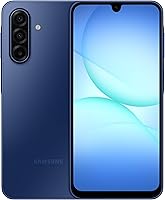
Google Pixel 10a Review: Worth It? (October 2026)
Our Google Pixel 10a review recommends it for buyers who want Google AI tools, camera guidance and a bright OLED screen. Choose an alternative if pen input, more built-in storage or a stated long-term update commitment matters most.
On this page (9 sections)
- Google Pixel 10a review: who should buy it?
- What does the Pixel 10a display offer outdoors?
- Can the Pixel 10a battery cover your day?
- Are Camera Coach and Gemini good reasons to choose it?
- Is 128GB enough for your next phone?
- How should you protect and care for the Pixel 10a?
- Which alternative solves a need the Pixel doesn't?
- What should you check before switching to the Pixel 10a?
- Which phone should you choose after this Google Pixel 10a review?
Our Google Pixel 10a review recommends it for buyers who want Google's AI tools, camera guidance and a bright screen in an unlocked Android phone. Its strongest appeal is the mix of everyday features, rather than one feature that makes it the right choice for everyone.
Choose it if you expect to use Gemini or Camera Coach and keep a manageable local file library. A built-in pen, more storage or a clear long-term update commitment gives the alternatives below a stronger reason to earn your money.
Google Pixel 10a review: who should buy it?
The Pixel 10a suits Google AI users and everyday photo takers who want help planning, creating and handling unwanted calls. It's also worth considering if you regularly read messages or follow directions outdoors.
Google Pixel 10a

- Gemini and Camera Coach
- Actua OLED display
- Wireless charging
- Nano SIM and eSIM
Choose the Pixel 10a for Google's AI tools, camera guidance and a screen designed for bright conditions. Check your storage use before choosing this 128GB model.
Pros
- Gemini and Camera Coach
- Bright OLED display
- Fast and wireless charging support
- Works with major US carriers
Cons
- 128GB requires planning for large offline libraries
- Battery runtime depends on use and conditions
- No built-in pen for handwritten notes
Gemini can help brainstorm a meal plan, while Camera Coach offers a reason to explore camera guidance. Those are useful buying reasons when they match tasks you already do, rather than features you might open once.
The phone works with Google Fi, Verizon, T-Mobile, AT&T and other major carriers. That flexibility suits buyers who want to choose their own plan or change networks later.
Pixel 10a review: who should skip it?
Skip the Pixel if pen input or a large offline library is central to your routine. The Moto G Stylus 2025 directly addresses both needs, and the Moto G Stylus review explains that choice in more detail.
Buyers who rank a published software support promise above AI features should examine Samsung's option below. Don't assume every Android model has the same update policy, even when the phones meet similar everyday needs.
What does the Pixel 10a display offer outdoors?
The Actua OLED screen reaches 3,000-nit peak brightness, which Google says helps visibility in direct sunlight. That makes it relevant for outdoor messages, transit information and checking a map on a bright day.
Peak brightness describes a maximum, not the level the screen holds during every task. Automatic brightness is a useful starting point because it adjusts the screen as you move between indoor and outdoor light.
Text size and reach deserve as much attention as brightness. If small labels are hard to read, increase font and display size during setup, then check whether buttons and app menus still fit comfortably.
For frequent reading, choose comfortable text over squeezing more information onto the screen. A bright panel won't solve tiny type or controls that are awkward to reach with one hand.
Can the Pixel 10a battery cover your day?
Google claims more than 30 hours on a full charge, making the Pixel worth considering for ordinary daily use. Your charging schedule will still depend on how much time you spend recording video, using mobile data and keeping the screen lit.
A runtime claim isn't the same as hours of continuous screen use. Think about your longest routine day away from an outlet, including the trip home, rather than your lightest day at home.
The phone supports fast charging and wireless charging. Choose a charging spot that fits your habits, such as a desk or bedside table, and confirm charger compatibility before buying accessories.
Weak reception and heavy background activity can increase battery use on any phone. If the battery drains faster than expected, review app battery use and screen settings before changing several options at once.
Motorola advertises a longer maximum for the Moto G Power below. Different usage conditions mean those claims don't establish a precise gap between the phones.
Are Camera Coach and Gemini good reasons to choose it?
Camera Coach and Gemini are good reasons to choose the Pixel if you'll use their guidance, but they don't establish a camera-quality ranking. Choose based on the tasks you need help with, then examine photo examples that match what you shoot.
For children, pets or indoor family meals, look for examples involving movement and dim light. A bright outdoor landscape tells you little about how a phone handles a moving subject in a room.
Basic photo habits also matter: wipe the lens with a clean microfiber cloth, tap your subject to set focus and move closer when practical. Heavy digital zoom can make fine detail harder to preserve.
Gemini can help with planning and creative ideas, and Nano Banana adds another creative tool. Check generated suggestions before relying on them for travel details, schedules or other facts that need to be right.
Spam call screening may matter more than creative tools if unwanted calls interrupt your day. For the wider software choice, read Pixel vs Samsung phones.
Is 128GB enough for your next phone?
128GB can suit everyday apps and a managed photo collection, but it's a poor fit for someone who already struggles to clear space. Check your current storage use before deciding, especially videos, downloaded shows and message attachments.
Leave room for system files, app updates and new photos. A phone that only just holds today's files gives you little room to grow.
Cloud storage can reduce local clutter, but it brings account, connection and backup choices. Confirm that your photos are backed up and accessible before removing local copies.
Keep essential travel files available offline, including tickets, addresses and any documents you may need without service. Storage management should preserve those files rather than clearing everything indiscriminately.
Don't choose the Pixel on the assumption that you can add a memory card later. If removable storage is a requirement, confirm support for the exact phone before ordering.
How should you protect and care for the Pixel 10a?
Use a case and sensible care even though the Pixel has IP68 water and dust protection and scratch-resistant Corning Gorilla Glass 7i. These safeguards reduce some risks; they don't make the phone immune to damage.
Choose a case that fits the exact model and leaves the camera, microphones and charging port clear. If you want wireless charging, confirm that the case supports your intended setup.
Keep the phone away from sand, salt water and prolonged heat. Don't leave it on a hot dashboard or charge it under bedding where heat can build up.
After liquid exposure, let the phone and charging port dry before connecting a cable. Avoid pushing tools into the port to remove moisture or dirt.
For routine cleaning, use a soft cloth and follow Google's care instructions. Scratch resistance doesn't remove the need to keep grit away from the screen.
Which alternative solves a need the Pixel doesn't?
Choose an alternative when its main feature changes how you'll use the phone. A pen, a software support promise or a larger screen is a better reason to switch than collecting extra specifications.
Moto G Stylus 2025 for notes and downloaded files
The Moto G Stylus 2025 suits people who write, sketch or mark up photos regularly. Its built-in stylus gives you a specific reason to choose it over ordinary touch input.
Moto G Stylus 2025
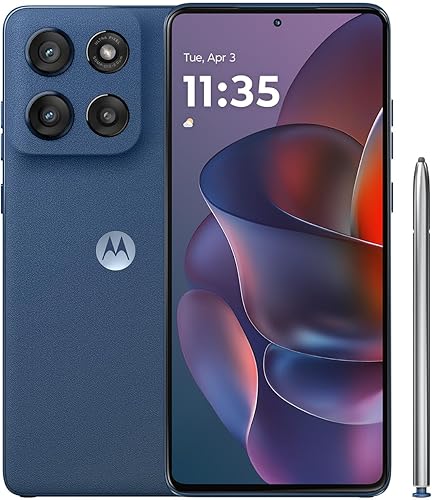
- Built-in stylus
- 6.7-inch pOLED display
- 256GB storage
- IP68 water and dust resistance
Pick the Moto G Stylus 2025 for frequent note-taking, sketches and more room for downloaded files. Its built-in pen gives it a clear purpose beyond ordinary touch controls.
Pros
- Pen stored inside the phone
- More built-in storage than the other models here
- Super HD pOLED display
- Compatible with major US carriers
Cons
- Motorola TurboPower 68W charger sold separately
- Charging slows as the battery fills
- Pen adds little value if you prefer typing
Its 256GB storage also suits larger local file libraries, while the 6.7-inch Super HD pOLED display gives you space for notes and media. Students, frequent list makers and people who save entertainment for travel should give it particular attention.
Skip it if you always type and keep most files online. The pen is useful when it replaces a task you already do, not simply because it's available.
Maximum charging requires a Motorola TurboPower 68W charger, sold separately. Motorola's short-charge claim depends on conditions including a substantially depleted battery and charge boost being enabled.
Galaxy A37 5G for keeping a phone longer
The Galaxy A37 5G suits buyers who value a clear software support commitment. Samsung promises 6 OS upgrades and 6 years of security updates.
Galaxy A37 5G
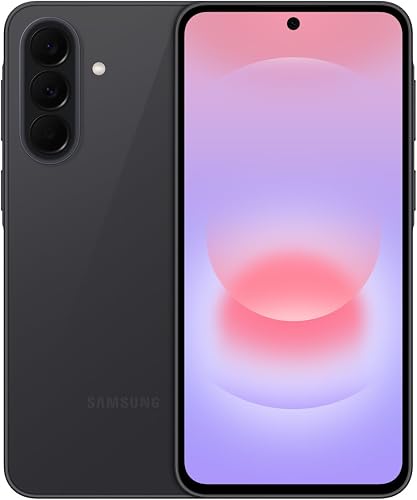
- 6.7-inch Super AMOLED display
- Triple camera system
- Samsung photo editing tools
- 6-year security update commitment
Consider the Galaxy A37 5G if you plan to keep your phone for years and want Samsung's photo editing tools. Samsung promises 6 OS upgrades and 6 years of security updates.
Pros
- Clear software update commitment
- Object Eraser and Edit Suggestion
- Large AMOLED display
- IP68 water and dust resistance
Cons
- 128GB needs care with large offline libraries
- 45W charger sold separately
- Charging speed varies with battery level and other factors
It combines a 6.7-inch Super AMOLED display with a triple-camera system and a 50MP HDR main camera. Object Eraser, My Filter and Edit Suggestion suit people who like adjusting photos after taking them.
Its built-in storage capacity matches the Pixel's, so switching brands doesn't solve a crowded file library. The separate 45W charger is another accessory to consider if fast charging matters.
Skip it if pen input or more built-in storage is your main need. For another Samsung comparison point, see whether the Galaxy A17 is a good phone.
Moto G Power 2026 for time away from outlets
The Moto G Power 2026 suits people who plan their day around fewer charging stops. Motorola claims up to 49 hours of battery life under its stated mixed-use conditions.
Moto G Power 2026

- 6.8-inch FHD+ LCD
- Up to 120Hz refresh rate
- Motorola claims up to 49 hours of battery life
- Camera system with OIS
Consider the Moto G Power 2026 when time away from a charger and a large screen lead your decision. Its battery claim is a useful comparison point, with actual runtime dependent on your use.
Pros
- Largest screen among these alternatives
- Long advertised battery runtime
- Optical image stabilization
- Compatible with major US carriers
Cons
- Maximum charging speed is 30W
- TurboPower 33W or higher charger sold separately
- Large screen may make one-handed use less convenient
Its 6.8-inch FHD+ LCD supports up to a 120Hz refresh rate, with actual behavior depending on settings and content. The camera system includes optical image stabilization, a feature worth considering for photo and video use.
Check pocket fit and one-handed reach before choosing such a large screen. Skip it if easy handling matters more than display space.
Charging tops out at 30W and requires a separate Motorola TurboPower 33W or higher charger for rapid charging. Read whether the Moto G Power is a good phone if this tradeoff fits your routine.
What should you check before switching to the Pixel 10a?
Confirm carrier acceptance, SIM setup and account access before moving your number. The Pixel supports a single Nano SIM and eSIM, but your carrier determines the activation process.
Ask the carrier to check the exact device and the services your plan needs. Our guide to unlocked Android phones explains the broader device-and-plan decision, while using an unlocked phone with Verizon covers that network specifically.
Don't confuse compatibility with the status of your old phone. Read how to check if your phone is unlocked if you plan to reuse it with another carrier or keep it as a spare.
Before transferring data, back up photos, contacts and messages. Confirm your account passwords, recovery methods and the transfer process for any authenticator apps.
Keep the old phone until the new one can make calls, receive texts and open your essential accounts. Banking, work access and verification codes deserve attention before you erase anything.
Install available system and app updates, then set a strong screen lock and review notification privacy. Adjust text size and brightness before spending time arranging every app.
The first-time unlocked phone setup guide walks through the move in more detail.
Which phone should you choose after this Google Pixel 10a review?
Choose the Pixel 10a for Google assistance and camera guidance when your current storage habits fit its capacity. Before ordering, confirm carrier activation and decide how you'll charge it at home and away.
Choose the Moto G Stylus for frequent handwriting or a larger local library. Choose the Galaxy A37 for Samsung's stated update commitment, or the Moto G Power when long outings and a large screen drive your decision.
The key decision in this Google Pixel 10a review is which feature you'll use every week. For a closer look at the final choice, read Is the Google Pixel 10a worth buying?.
Frequently asked questions
Is the Google Pixel 10a unlocked?
Yes, the Google Pixel 10a is an unlocked Android phone that works with Google Fi, Verizon, T-Mobile, AT&T and other major carriers. Before moving your number, ask your carrier to confirm the exact device, your plan and your preferred Nano SIM or eSIM activation method.
How long does the Pixel 10a battery last?
Google claims more than 30 hours from a full charge, but your daily runtime depends on screen use, apps, signal strength and settings. Think about your longest normal day away from power, and keep a charging option available for heavy camera use, video calls or travel.
Does the Pixel 10a have water protection?
Yes, the Pixel 10a has IP68 water and dust protection, plus scratch-resistant Corning Gorilla Glass 7i on its display. Water resistance is a safeguard against accidents, not a reason to take the phone swimming; keep it away from salt water and let it dry before charging.
Should I get the Pixel 10a or Moto G Stylus 2025?
Choose the Pixel 10a if Gemini, Camera Coach and a bright OLED screen solve your daily needs. Choose the Moto G Stylus 2025 if you'll regularly write or sketch with its built-in pen, or need its larger built-in storage capacity for photos, downloaded videos and other files.