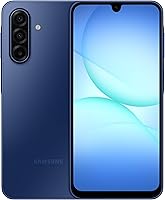
6 Best Budget Android Phones (October 2026)
The best budget Android phones include the Moto G Stylus 2024 for handwritten reminders, the Moto G Power 2025 for couch viewing, and the Galaxy A17 5G for keeping phones longer.
On this page (8 sections)
- Which budget Android phone fits your priorities?
- How we chose these budget Android phones
- Best budget Android phones by use
- How do you choose the best budget Android phone?
- What should you do when your new Android phone arrives?
- How can you keep a budget phone useful for longer?
- Which mistakes make a budget phone a poor buy?
- Which budget Android phone should you choose?
The Moto G Stylus 2024 is the best budget Android phone in this group for buyers who will use its pen, pOLED screen and stabilized camera. Choose the Galaxy A17 5G for a clear software support commitment or the Moto G Power 2025 for a larger screen and wireless charging.
Start with the job your current phone handles poorly. Running out of app space, struggling to read small text and needing more years of security support call for different solutions.
If you want to focus on a lower spending limit, see our picks for budget Android phones. For carrier flexibility, our guide to unlocked Android phones explains what to check before switching networks.
Our picks at a glance
-
1
-
2

-
3

Which budget Android phone fits your priorities?
Choose the Moto G Stylus 2024 for pen use, the Power for entertainment or the A17 for keeping a phone longer. The remaining picks suit simpler needs, with tradeoffs in screen detail, memory or network access.
Use the cards to make a short list of 2 models. Then compare the drawback you're most likely to notice, rather than counting how many features each phone has.
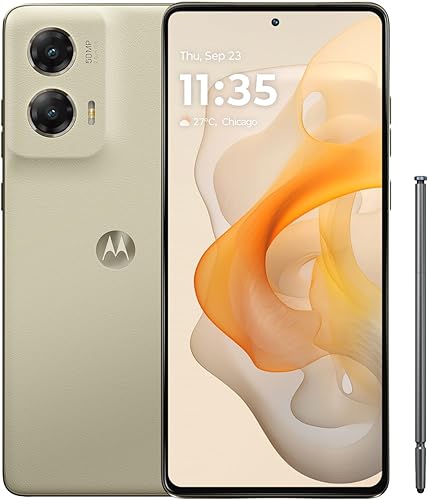
Moto G Stylus 2024
- Built-in stylus
- 6.7 in pOLED display
- 50MP camera with OIS
- 5000mAh battery
Choose this model if you'll write reminders, sketch or mark up photos with the built-in stylus. The pOLED screen and stabilized camera also make it worth considering for reading and everyday photos.
Pros
- Built-in stylus for notes and sketches
- pOLED display
- Camera with optical image stabilization
Cons
- Pen adds little if you prefer typing
- RAM Boost reduces available storage
Moto G Power 2025
- 6.8 in 120Hz display
- 5000mAh battery
- 50MP camera with OIS
- Wireless charging
The large screen and stereo speakers suit buyers who watch shows without headphones. Wireless charging adds another way to top up, while the OIS camera helps address hand movement during photos.
Pros
- Largest screen in this group
- Stereo speakers with Bass Boost
- Wireless charging
Cons
- Large body needs a pocket and grip check
- 30W charger sold separately
Galaxy A17 5G
- 6.7 in Super AMOLED display
- 6 OS upgrades
- 6 years of security updates
- Expandable storage
Samsung's stated update commitment makes this the clearest fit for buyers who keep a phone for years. Its Super AMOLED screen and expandable storage also suit reading and a growing photo library.
Pros
- Clear software and security support commitment
- Super AMOLED display
- Supports microSD cards up to 2TB
Cons
- Support window starts at global manufacture
- 25W charger and microSD card sold separately
Moto g 2026

- 6.7 in 120Hz display
- 5200mAh typical battery capacity
- 50MP camera
- Stereo speakers
Choose this phone for a fast-refreshing screen, stereo sound and the largest battery capacity here. Buyers who spend more time reading fine text should weigh its HD+ resolution against sharper alternatives.
Pros
- Up to 120Hz refresh rate
- Largest battery capacity in this group
- Stereo speakers with Dolby Atmos
Cons
- HD+ resolution favors motion over fine detail
- 4GB physical RAM; RAM Boost uses storage
Moto G 2025

- 6.7 in 120Hz display
- 5000mAh battery
- 50MP camera
- Supports microSD cards up to 1TB
This is a practical choice for downloaded music, personal videos and photos kept on a memory card. Choose it when media storage matters more than an OLED screen or wireless charging.
Pros
- Supports microSD cards up to 1TB
- Up to 120Hz display
- Stereo speakers
Cons
- HD+ LCD screen
- 30W charger sold separately
Moto G Play 2024
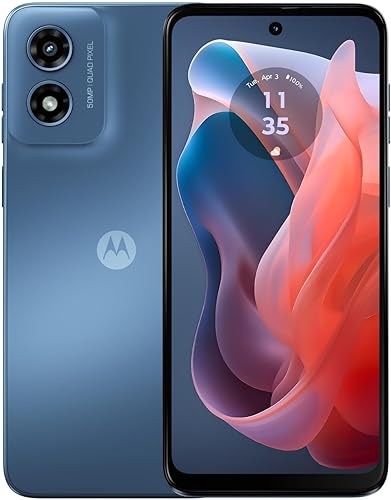
- 4G connectivity
- 6.5 in 90Hz HD+ display
- 64GB storage
- Supports microSD cards up to 1TB
Consider this model for light use or a backup phone on a compatible network. Its smaller built-in storage allowance calls for more file management than the other picks.
Pros
- Up to 90Hz display
- Supports microSD cards up to 1TB
- Stereo speakers
Cons
- No 5G connection
- 64GB built-in storage leaves less room for apps
How we chose these budget Android phones
We compared display quality, useful camera features, memory, charging and software support for common budget-phone needs. The order favors features that solve daily problems, such as marking up a photo or keeping a phone secure for longer.
These scores reflect that balance, so a lower-ranked model can still suit you better. A pen has little value to someone who only types, while a clear update commitment matters more if you rarely replace a phone.
Carrier fit comes before the score. Read our unlocked phone buying guide and confirm that your carrier accepts the exact model before moving your number.
| Product | Best for | Display | Storage | Camera | Our score |
|---|---|---|---|---|---|
| Moto G Stylus 2024 | handwritten reminders | 6.7 in pOLED | 128GB | 50MP with OIS | 8.4 |
| Moto G Power 2025 | couch viewing | 6.8 in, up to 120Hz | 128GB | 50MP with OIS | 8.3 |
| Galaxy A17 5G | keeping phones longer | 6.7 in Super AMOLED | 128GB | 8.0 | |
| Moto g 2026 | everyday scrolling | 6.7 in HD+, up to 120Hz | 128GB | 7.8 | |
| Moto G 2025 | offline media libraries | 6.7 in, up to 120Hz | 128GB plus microSD support | 50MP Quad Pixel | 7.7 |
| Moto G Play 2024 | basic backup service | 6.5 in HD+, up to 90Hz | 64GB plus microSD support | 6.9 |
Best budget Android phones by use
The Stylus is the most versatile choice here, but the right alternative depends on what you'll use each day. Read each recommendation with its skip advice, especially if screen size or app switching is a concern.
Moto G Stylus 2024
- Built-in stylus
- 6.7 in pOLED display
- 50MP camera with OIS
- 5000mAh battery
Choose this model if you'll write reminders, sketch or mark up photos with the built-in stylus. The pOLED screen and stabilized camera also make it worth considering for reading and everyday photos.
Pros
- Built-in stylus for notes and sketches
- pOLED display
- Camera with optical image stabilization
Cons
- Pen adds little if you prefer typing
- RAM Boost reduces available storage
Choose the Moto G Stylus 2024 if you regularly write reminders, sketch ideas or mark up photos. The built-in pen gives it a purpose beyond the usual calls, messages and scrolling.
A useful routine might be circling a detail in a photo before sending it or writing a short shopping reminder. If you already prefer handwriting to typing, this feature has a clear place in your day.
The 6.7 in pOLED screen has a 2400 x 1080 resolution, making it worth considering for text and image detail. Its 50MP camera includes optical image stabilization, which Motorola says helps with low-light photos and video steadiness.
The battery is 5000mAh, with support for 30W TurboPower charging. Actual time between charges depends on your signal, settings and use, so don't choose it around a fixed runtime promise.
Skip it if the pen would stay tucked away and another priority matters more. The A17 makes more sense for an update-focused buyer, while the Power better suits someone who wants a larger viewing area and wireless charging.
Moto G Power 2025
- 6.8 in 120Hz display
- 5000mAh battery
- 50MP camera with OIS
- Wireless charging
The large screen and stereo speakers suit buyers who watch shows without headphones. Wireless charging adds another way to top up, while the OIS camera helps address hand movement during photos.
Pros
- Largest screen in this group
- Stereo speakers with Bass Boost
- Wireless charging
Cons
- Large body needs a pocket and grip check
- 30W charger sold separately
The Moto G Power 2025 fits someone who watches shows, follows video recipes or listens through the phone's speakers. Its 6.8 in screen is the largest here, and stereo speakers with Bass Boost support that entertainment focus.
The display refreshes at up to 120Hz, with the actual rate depending on content and settings. That can help supported scrolling look smoother, but it doesn't make a slow connection load video faster.
Wireless charging is the more useful distinction if you want a charging pad beside your chair or bed. Wired charging supports up to 30W, with the required TurboPower charger sold separately.
Its 50MP OIS camera also makes it worth comparing with the Stylus for everyday photos. For app switching, it has 8GB of physical RAM; the larger advertised memory total includes storage used by RAM Boost.
Skip it if large phones feel awkward in your pocket or during one-handed use. Check its size against your current phone before buying, and choose the A17 instead if a stated long-term support window leads your decision.
Galaxy A17 5G
- 6.7 in Super AMOLED display
- 6 OS upgrades
- 6 years of security updates
- Expandable storage
Samsung's stated update commitment makes this the clearest fit for buyers who keep a phone for years. Its Super AMOLED screen and expandable storage also suit reading and a growing photo library.
Pros
- Clear software and security support commitment
- Super AMOLED display
- Supports microSD cards up to 2TB
Cons
- Support window starts at global manufacture
- 25W charger and microSD card sold separately
The Galaxy A17 5G is the clearest choice for buyers who want to keep a phone for years. Samsung promises 6 OS upgrades and 6 years of security updates, counted from the date of global manufacture.
That starting point matters: buying the phone later doesn't restart the support clock. Check how much of the promised window remains if you expect to keep it for a long time.
Its 6.7 in Super AMOLED display suits reading, photos and video. The triple-lens camera offers different ways to frame a scene, while microSD support up to 2TB gives a growing media collection room beyond internal storage.
The IP54 rating covers limited dust resistance and fresh-water splashes. It isn't a reason to use the phone in a pool or take it into the sea.
Skip it if a built-in pen or wireless charging is your main requirement; the Stylus and Power address those needs directly. Read our Samsung Galaxy A17 overview if the update commitment makes this your front-runner.
Moto g 2026
- 6.7 in 120Hz display
- 5200mAh typical battery capacity
- 50MP camera
- Stereo speakers
Choose this phone for a fast-refreshing screen, stereo sound and the largest battery capacity here. Buyers who spend more time reading fine text should weigh its HD+ resolution against sharper alternatives.
Pros
- Up to 120Hz refresh rate
- Largest battery capacity in this group
- Stereo speakers with Dolby Atmos
Cons
- HD+ resolution favors motion over fine detail
- 4GB physical RAM; RAM Boost uses storage
Choose the Moto g 2026 if you want smooth everyday scrolling and a large battery, and can accept less screen detail. Its 6.7 in display reaches up to 120Hz but uses a 1604 x 720 HD+ resolution.
That tradeoff matters if you spend long stretches reading small text, viewing charts or examining photos. A fast refresh rate improves how supported motion looks; it doesn't add detail to each frame.
The 5200mAh typical battery capacity is the largest in this group. It gives you a reason to consider the phone, though it doesn't prove longer real-world runtime than every alternative.
The phone has a 50MP rear camera, a 32MP selfie camera and stereo speakers with Dolby Atmos. Its 4GB physical RAM is a more useful comparison point than the larger total that includes RAM Boost.
Skip it for frequent switching between demanding apps, or if crisp text is your main screen priority. Charging reaches up to 30W with a suitable Motorola TurboPower charger, but in-box charger availability varies by market.
Moto G 2025
- 6.7 in 120Hz display
- 5000mAh battery
- 50MP camera
- Supports microSD cards up to 1TB
This is a practical choice for downloaded music, personal videos and photos kept on a memory card. Choose it when media storage matters more than an OLED screen or wireless charging.
Pros
- Supports microSD cards up to 1TB
- Up to 120Hz display
- Stereo speakers
Cons
- HD+ LCD screen
- 30W charger sold separately
The Moto G 2025 suits buyers who keep music, personal videos and photos locally. Its 128GB internal storage is paired with microSD support up to 1TB, giving supported media somewhere separate to live.
That flexibility helps if you prepare entertainment before a trip or avoid relying on mobile data for every file. Streaming apps can limit which downloads move to a card, so don't assume every saved show can use it.
The 6.7 in LCD screen offers up to 120Hz refresh but has HD+ resolution. It favors smooth scrolling over fine detail, so compare the Stylus or A17 if reading and photo viewing take priority.
Motorola pairs a 50MP Quad Pixel rear camera with a 16MP front camera. Its water-repellent design covers moderate fresh-water exposure such as light rain, not immersion, and that protection can diminish over time.
Skip it if your storage problem is mainly large apps, since a card won't automatically solve that issue. Our Moto G vs Moto G Power comparison helps if you're deciding between media storage and the Power's extra features.
Moto G Play 2024
- 4G connectivity
- 6.5 in 90Hz HD+ display
- 64GB storage
- Supports microSD cards up to 1TB
Consider this model for light use or a backup phone on a compatible network. Its smaller built-in storage allowance calls for more file management than the other picks.
Pros
- Up to 90Hz display
- Supports microSD cards up to 1TB
- Stereo speakers
Cons
- No 5G connection
- 64GB built-in storage leaves less room for apps
The Moto G Play 2024 is a reasonable choice for light use or a backup phone on a compatible network. Its 4G connection can cover calls, messages, maps and web use where your carrier provides suitable service.
The main limit is its 64GB of internal storage, compared with the other picks' 128GB. Software uses some of that space before you add apps, so this model asks for a more selective approach.
A microSD card up to 1TB can hold supported media files. Keep photos and downloaded music there when possible, leaving internal storage for apps that need it.
The phone pairs a Snapdragon 680 processor and 4GB RAM with a 6.5 in HD+ screen that reaches up to 90Hz. Stereo speakers make it usable for casual listening without headphones.
Skip it if you want 5G, keep many apps or dislike managing storage. Before choosing it for a specific network, read our guide to using an unlocked phone on Verizon and confirm the exact model with your carrier.
How do you choose the best budget Android phone?
Choose around your biggest daily need, then check memory, carrier fit and support before buying. A useful extra feature can't make up for a phone that lacks space for your apps or won't activate on your plan.
What matters most in a budget Android phone screen?
Match screen detail to your content and size to your grip. OLED and AMOLED panels can show deep blacks, while resolution affects fine text and image detail.
Refresh rate answers a separate question: how often the screen can refresh its image. A higher maximum can improve supported scrolling, but it doesn't make text sharper or guarantee better gaming performance.
If your current screen is hard to read, enlarge the font before deciding you need a bigger phone. A larger body may be harder to hold, especially with a case.
How much storage and physical RAM do you need?
Use your current phone's storage screen as a guide. Check how much space apps, photos and downloads use, then leave room for growth rather than choosing a capacity that's already nearly full.
Internal storage holds the operating system and apps as well as personal files. A memory card helps with supported media, but some apps and protected downloads must stay inside the phone.
Physical RAM serves a different job: it helps keep active work available while you move between apps. Prefer more physical RAM if you often switch among maps, a browser, messaging and other tasks.
RAM Boost uses storage as virtual memory. It shouldn't be counted as equal to the same amount of physical RAM when comparing phones.
Which camera features matter for family photos?
Prioritize stabilization, lighting and your usual subjects over megapixel totals. OIS helps reduce blur from small hand movements, but it can't stop a moving child or pet from blurring.
For everyday shots, move toward better light and keep the lens clean. A high-resolution camera can't recover detail hidden by fingerprints or poor framing.
Several Motorola cameras here combine 4 sensor pixels into 1 for standard photos. A large sensor megapixel figure therefore doesn't mean every saved image uses that full resolution.
How should battery and charging affect your choice?
Choose charging features around where you spend your day. A desk charging pad, a short wired top-up before leaving and a long day away from outlets are different needs.
Battery capacity alone doesn't settle runtime. Weak signal, screen brightness, games and hotspot use can change how quickly any phone runs down.
Check the charger and cable you already have before adding accessories. A higher-power charger can't force a phone beyond its supported charging limit, and the fastest rate isn't maintained throughout the whole charge.
How should you check carrier compatibility?
Ask your carrier to confirm the exact model before transferring service. An unlocked phone still needs the right network support, and 5G also depends on coverage and your plan.
Our guides explain how to check whether a phone is unlocked and how to use an unlocked phone on T-Mobile. Confirm activation requirements, including whether you'll need a replacement SIM.
If you're buying your first unlocked device, follow how to buy an unlocked phone that works in the US. Do this check before ordering accessories or arranging a number transfer.
What should you do when your new Android phone arrives?
Set up the new phone while keeping the old one available. That gives you a way to recover accounts, compare files and catch transfer problems before erasing anything.
Back up and prepare your accounts
Back up photos, contacts and other files you need before starting the transfer. Check that you know your main account password and can receive its verification codes.
Authenticator apps, banking apps and messaging services may need separate steps. Save recovery codes securely and follow each service's transfer process rather than assuming a general phone backup covers everything.
Transfer only what you'll use
Bring over essential apps first, then add the rest as needed. This saves storage and makes it easier to spot an old app that's sending unwanted notifications or using power in the background.
Install available system and app updates over Wi-Fi. Give the phone time to finish downloads and file transfers before judging its battery use during normal days.
Check service before erasing the old phone
Make a call, send a text and load a page with Wi-Fi turned off. Check voicemail and any carrier features you rely on, too.
Confirm your photos, contacts and important messages arrived before wiping the old device. Our guide to using an unlocked phone for the first time covers the wider activation process.
Set up security and readable controls
Choose a screen lock, enable backups and review the phone's lost-device settings. Make text and display elements large enough to read comfortably, then reduce notifications to the ones you need.
For a shared family setup, make sure the person using the phone knows the passcode and recovery details. Keeping control of their own account makes future repairs and replacements easier.
How can you keep a budget phone useful for longer?
Protect its storage, battery and software with simple habits. Regular backups and small cleanups help prevent the problems that make a working phone feel ready for replacement.
Keep storage available
Review large videos and downloaded files when storage starts getting tight. Back up anything important before removing it, and use the phone's built-in storage tools rather than installing cleanup apps on impulse.
Treat a microSD card as storage, not your only backup. Keep another copy of irreplaceable photos, since a lost phone can take both internal storage and the card with it.
Limit heat and charge with care
Avoid leaving the phone on a hot dashboard or charging it under bedding. If it becomes unusually warm during a demanding task, pause the task and let it cool in a shaded place.
Use an undamaged, compatible charger and cable. Clean the screen with a soft cloth, and avoid pushing metal tools into the charging port.
Respect water protection limits
Keep the phone away from pools, salt water and pressurized water. Splash resistance doesn't make a phone safe for deliberate immersion.
If the phone gets wet, follow its care instructions and let the charging connection dry before plugging it in. A case can help with everyday bumps, but it doesn't change the phone's water-protection rating.
Which mistakes make a budget phone a poor buy?
Buying for a headline number instead of a daily need is the biggest mistake. Check what the feature changes for you before letting it decide the purchase.
A newer model year doesn't automatically mean a sharper screen, more physical RAM or a better fit. Compare the exact versions, since similar Moto G names can hide meaningful differences.
Don't choose a memory-card phone to solve an app-storage problem without checking where your apps can live. Likewise, don't count virtual memory as if it were extra physical RAM.
Avoid planning a long ownership period around the phone's purchase date alone. A stated support window may start earlier, and security support matters even if the hardware still works.
Finally, include a compatible charger, case or memory card in your buying plan where needed. An extra you won't use, such as a pen or charging pad, shouldn't pull you away from the phone that fits your actual routine.
Which budget Android phone should you choose?
Choose your best budget Android phone by the tradeoff you can accept. Pick the Stylus for handwritten work and a sharper screen, the Power for viewing and charging convenience, or the A17 for Samsung's support commitment.
Choose the Moto g 2026 if scrolling and battery capacity lead your needs. The Moto G 2025 suits supported offline media, while the Play fits light use if its smaller internal storage and 4G connection are enough.
Before ordering, settle 3 things: carrier approval, enough internal storage and the feature you'll use most. See our best cheap unlocked phones if a carrier switch is driving the decision.
Our top 3 picks at a glance
-
1
-
2
-
3
Frequently asked questions
What is the best budget Android phone?
The Moto G Stylus 2024 is our top pick for buyers who want a built-in pen, a pOLED screen and an OIS camera. Choose the Galaxy A17 5G if keeping a phone through a clear software support window matters more, or the Moto G Power 2025 for wireless charging.
Which budget Android phone has the best battery features?
Choose the Moto g 2026 for the largest battery capacity here, or the Moto G Power 2025 if wireless charging matters more. Battery capacity doesn't establish a runtime winner because screen settings, signal strength and usage affect power use, so plan around your charging routine rather than capacity alone.
Can budget Android phones use 5G?
Yes, every phone in this group supports 5G except the Moto G Play 2024, which uses 4G. Your exact model must also work with your carrier, and access to 5G depends on your plan and local coverage, so confirm those details before transferring your number.
How much storage should I look for in a budget phone?
Choose 128GB as a starting point if you use many apps or keep photos and videos locally. A microSD card can add space for supported files, but it doesn't replace internal app storage, and the operating system already uses part of the phone's built-in capacity.
Does RAM Boost replace physical RAM?
No, RAM Boost uses part of internal storage as virtual memory rather than adding physical RAM. Compare the physical RAM figure first, especially if you switch between several apps, and remember that assigning more space to RAM Boost leaves less storage available for your own apps and files.