7 Best Motorola Phones (October 2026)
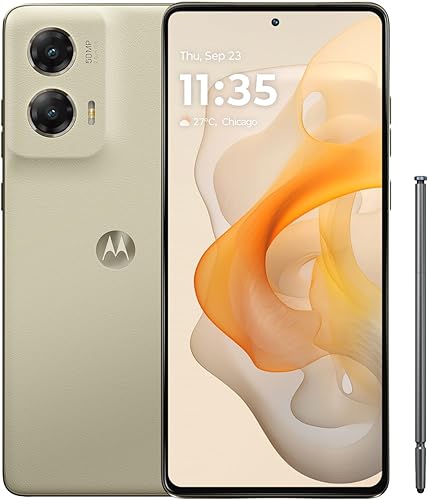
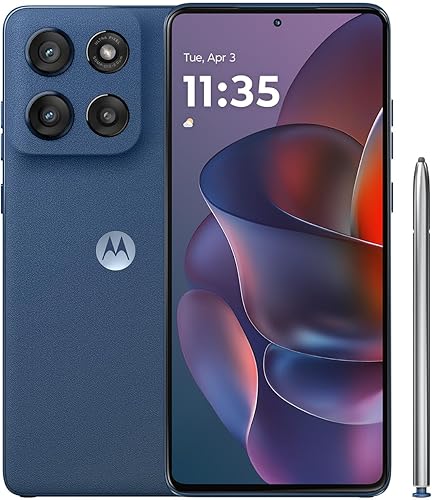
The best best Motorola phones include the Moto G Stylus 2024 for everyday note takers, the Moto G Power 2025 for bedside charging, and the Moto G Stylus 2025 for keeping creative projects.
On this page (7 sections)
- How we chose the best Motorola phone
- Compare the best Motorola phones
- Which Motorola phone fits your needs?
- What should you check before buying a Motorola phone?
- How should you set up your Motorola phone?
- How can you protect the phone and avoid common mistakes?
- Which best Motorola phone should you choose?
The best Motorola phone for most people here is the Moto G Stylus 2024, thanks to its useful mix of pen input, a pOLED screen and a stabilized camera. Choose the Moto G Power 2025 if wireless charging matters more, or the Stylus 2025 if you keep more files.
Start with what your current phone makes difficult. Running out of app space, struggling to read small text and wanting handwritten notes call for different upgrades.
If you're comparing brands as well as models, see our Pixel vs Samsung comparison. For more about one Power model, read is the Moto G Power a good phone?.
Our picks at a glance
-
1
-
2

-
3
How we chose the best Motorola phone
Useful daily features guided these picks: pen input, screen quality, storage, charging choices and camera stabilization. NeighborlyNod compared the supplied specifications and features without treating a newer model year as an automatic win.
The ranking favors a useful mix of features, but your strongest requirement can point to a lower-ranked phone. Someone carrying a large collection of creative files should favor the Stylus 2025 over the first pick.
We also separated features that sound alike but serve different purposes. Screen refresh rate affects motion, resolution affects detail, and borrowed storage through RAM Boost is different from physical memory.
Compare the best Motorola phones
Compare the feature you need first, then check the compromises beside it. The Stylus models suit pen users, the Power models offer larger screens with camera stabilization, and the standard Moto G and Play options cover simpler needs.
| Product | Best for | Display | Camera | Storage | Our score |
|---|---|---|---|---|---|
| Moto G Stylus 2024 | everyday note takers | 6.7-inch pOLED | 50MP with OIS | 128GB | 8.4 |
| Moto G Power 2025 | bedside charging | 6.8-inch, up to 120Hz | 50MP with OIS | 8.3 | |
| Moto G Stylus 2025 | keeping creative projects | 6.7-inch Super HD pOLED | 256GB | 8.1 | |
| Moto g 2026 | everyday scrolling | 6.7-inch HD+, up to 120Hz | 128GB | 7.8 | |
| Moto G 2025 | offline media libraries | 6.7-inch LCD, up to 120Hz | 128GB; supports microSD cards up to 1TB | 7.7 | |
| Moto G Power 2026 | outdoor workdays | 6.8-inch FHD+ LCD, up to 120Hz | 50MP with OIS | 7.5 | |
| Moto G Play 2024 | light phone users | 6.5-inch HD+, up to 90Hz | 64GB; supports microSD cards up to 1TB | 6.9 |
Use the table to narrow the choice to 2 phones. A long feature list matters less than removing the specific problem that made you replace your old phone.
Which Motorola phone fits your needs?
Choose by your main daily task, rather than the model name alone. Notes, downloaded media, outdoor work and basic calls each point toward a different fit within this group.
Moto G Stylus 2024: best Motorola phone for everyday notes
Moto G Stylus 2024
- Built-in stylus
- 6.7-inch pOLED display
- 50MP camera with OIS
- 128GB storage
A built-in pen, pOLED screen and stabilized camera make this the first choice for buyers who mix everyday phone use with notes and sketches.
Pros
- Built-in stylus for notes and photo edits
- pOLED display with Dolby Atmos
- Optical image stabilization
Cons
- Less built-in storage than the Stylus 2025
- No reason to prioritize the pen if you prefer typing
Buy the Stylus 2024 if handwriting has a place in your routine. Its built-in pen supports quick notes, sketches and photo edits without requiring you to carry a separate stylus.
The 6.7-inch pOLED screen has a 2400 x 1080 resolution, while Dolby Atmos supports entertainment use. That combination makes this more than a phone bought only for its pen.
Its 50MP camera includes optical image stabilization, or OIS. Motorola says this helps with sharper low-light photos and smoother video, making it useful for handheld shots.
The 128GB capacity suits buyers who manage downloads and back up photos regularly. RAM Boost borrows internal storage, so leave room for both your files and normal app growth.
Skip it if you rarely write by hand and mainly want a large viewing area or charging convenience. For a pen phone with more built-in space, compare the Moto G Stylus 2025 review.
Moto G Power 2025: convenient charging for daily use
Moto G Power 2025
- 6.8-inch display, up to 120Hz
- 5000mAh battery
- 50MP camera with OIS
- Wireless charging
Choose this Power model for a large entertainment screen and the convenience of setting it on a compatible wireless charger.
Pros
- Large display for video and reading
- Stereo speakers with Bass Boost
- Wireless charging support
Cons
- Large body needs a pocket and grip check
- Maximum wired charging requires a separate compatible charger
Buy the Power 2025 if a wireless charging spot fits your routine. Setting the phone on a compatible pad beside your bed or desk can make regular charging easier to remember.
Its 6.8-inch display supports up to 120Hz, and stereo speakers include Bass Boost. This is a useful mix for people who watch shows, follow recipes or listen without headphones.
The phone has a 5000mAh battery, and Motorola estimates more than a day between charges under its stated usage conditions. Signal strength, brightness and your apps will affect the time you get.
It also combines a 50MP OIS camera with 8GB physical RAM. For wired charging, the maximum is 30W with a Motorola TurboPower 30W charger or higher, sold separately.
Skip this model if you want built-in pen input or dislike carrying a large phone. Our Moto G Power guide helps you judge its place in the range.
Moto G Stylus 2025: room for notes and creative files
Moto G Stylus 2025
- Built-in stylus
- 6.7-inch Super HD pOLED display
- 256GB storage
- IP68 water resistance
The larger built-in storage capacity suits people who keep drawings, photo edits and downloaded media alongside their apps.
Pros
- 256GB built-in storage
- Built-in stylus
- Super HD pOLED display
Cons
- Maximum charging speed requires a separate Motorola TurboPower 68W charger
- Water resistance decreases with wear
Buy the Stylus 2025 if you want to keep more work on the phone itself. Its 256GB capacity gives drawings, edited photos, apps and downloaded media more room to grow.
The built-in stylus pairs with a 6.7-inch Super HD pOLED display at 2712 x 1220 resolution. Favor this version if you spend time reading small text or inspecting detail in images.
Its maximum wired charging speed is 68W, using a Motorola TurboPower 68W charger sold separately. Motorola's quick-charge claim depends on conditions including a substantially depleted battery and charge boost being on.
IP68 water resistance adds protection against certain fresh-water exposure, but it decreases with wear. It does not make the phone suitable for underwater use.
Skip it if you only want occasional notes and already keep most files elsewhere. The Moto G Stylus 2025 review gives you a closer look before you choose this version.
Moto g 2026: a straightforward phone for feeds and messages
Moto g 2026

- 6.7-inch display, up to 120Hz
- 5200mAh typical battery capacity
- 50MP camera
- Stereo speakers
A straightforward choice for messages, social feeds and casual video when smooth scrolling matters more than fine screen detail.
Pros
- Up to 120Hz display refresh rate
- 5200mAh typical battery capacity
- Stereo speakers with Dolby Atmos
Cons
- HD+ screen has less detail than the FHD+ Power 2026
- 4GB physical RAM; RAM Boost uses storage
Buy the Moto g 2026 for ordinary phone tasks when motion matters more than fine display detail. Its 6.7-inch HD+ screen supports up to 120Hz, which can make supported scrolling and animation look smoother.
The typical battery capacity is 5200mAh, and stereo speakers support Dolby Atmos. These features fit a routine built around messaging, casual video and music.
It uses a MediaTek Dimensity 6300 processor with 4GB physical RAM. The advertised total with RAM Boost includes borrowed storage, so don't compare that total directly with another phone's physical memory.
The rear and selfie cameras use pixel combining, producing effective resolutions of 12.5MP and 8MP from their 50MP and 32MP sensors. Those headline sensor numbers alone should not decide your choice.
Skip it if sharper text and images are your main upgrade goal. Compare the Moto G and Moto G Power ranges if you're considering a higher-resolution Power screen.
Moto G 2025: expandable storage for an offline library
Moto G 2025

- 6.7-inch LCD, up to 120Hz
- 5000mAh battery
- 50MP camera
- MicroSD support up to 1TB
Expandable storage makes this a useful match for downloaded music, photos and other files you want to carry without relying on mobile data.
Pros
- MicroSD support up to 1TB
- Up to 120Hz display refresh rate
- Stereo speakers with Bass Boost
Cons
- HD+ screen resolution
- Water-repellent design does not allow submersion
Buy the Moto G 2025 if you want to carry media files without keeping everything in internal storage. It includes 128GB built in and supports a microSD card up to 1TB, sold separately.
That suits downloaded music, personal videos and photos you want available away from Wi-Fi. Check each media app's download settings because not every app lets you choose a memory card.
The 6.7-inch LCD has HD+ resolution and supports up to 120Hz. Stereo speakers with Bass Boost support casual listening, while the Dimensity 6300 processor and 4GB physical RAM cover its core hardware.
Its 50MP camera uses pixel combining for effective 12.5MP photos. The water-repellent design is for moderate exposure such as spills or light rain, rather than immersion.
Skip it if you need lots of internal space for apps or want OIS for handheld photos. Use our Moto G vs Moto G Power comparison to judge those tradeoffs.
Moto G Power 2026: protection for more exposed workdays
Moto G Power 2026

- 6.8-inch FHD+ LCD, up to 120Hz
- 5200mAh battery
- 50MP camera with OIS
- IP68/IP69 water and dust resistance
Water and dust resistance, protective glass and a large FHD+ screen suit buyers whose phones face more exposure during the day.
Pros
- FHD+ display with up to 120Hz refresh rate
- Camera with optical image stabilization
- IP68/IP69 water and dust resistance
Cons
- 128GB built-in storage
- Protection features do not make it waterproof or damage-proof
Buy the Power 2026 if your phone spends time around dust, rain or outdoor work. Its IP68/IP69 protection and Gorilla Glass 7i make protection features a central reason to consider it.
Those features still call for sensible care. Water resistance decreases with wear, and Motorola's protection claims do not promise that a future drop or liquid exposure will leave the phone unharmed.
The 6.8-inch FHD+ LCD supports up to 120Hz, making it a better match than the HD+ standard models for buyers who prioritize display detail. Its 50MP camera also includes OIS.
The 5200mAh battery supports a maximum 30W charge rate. Motorola specifies a TurboPower 33W charger or higher for rapid charging, sold separately, so check the accessory requirement rather than matching wattage numbers alone.
Skip it if your main need is handwriting or more built-in storage. Choose its protective design for everyday exposure, then add a case suited to how you carry it.
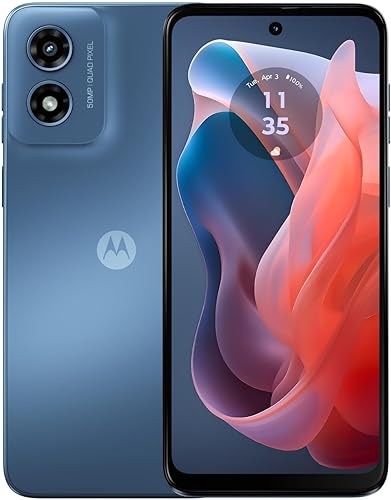
Moto G Play 2024: basic calls and a modest app collection
Moto G Play 2024
- 4G LTE
- 6.5-inch HD+ display, up to 90Hz
- 64GB storage
- MicroSD support up to 1TB
A basic option for calls, messages and a modest app collection when you have suitable LTE coverage and do not need 5G.
Pros
- MicroSD support up to 1TB
- Stereo speakers with Dolby Atmos
- 5000mAh battery
Cons
- 4G LTE rather than 5G
- 64GB built-in storage leaves less room for apps
Buy the Play 2024 if you need a light-use phone and suitable LTE service is available. Calls, messages and a small set of familiar apps are a clearer fit than a growing collection of games and downloads.
It uses a Snapdragon 680 processor with 4GB RAM. The 6.5-inch HD+ display supports up to 90Hz, and stereo speakers include Dolby Atmos.
Its 64GB internal capacity is the main limit to consider. MicroSD support up to 1TB gives media files somewhere else to go, but it does not turn that card space into built-in app storage.
A 5000mAh battery supports everyday use, while splash protection is limited to moderate exposure. Keep it away from submersion and pressurized water.
Skip it if you need 5G or already struggle with a phone that has little internal space. Read our Moto G Play review before choosing it as your main phone or a spare.
What should you check before buying a Motorola phone?
Check carrier approval, app space and physical fit before comparing smaller extras. A phone that fails one of those checks is a poor fit even if its camera or charging features appeal to you.
Confirm the exact model and carrier
An unlocked phone still needs to work with your provider's activation rules and network. Give the carrier the exact model details and use its compatibility check before moving your number.
Several phones here support major US carriers, but local coverage remains a separate question. Having 5G hardware does not ensure that a particular room, road or workplace gets a useful 5G signal.
Our unlocked Android phone buying guide explains the broader choices. Follow the US unlocked phone compatibility checklist when you're ready to check a specific device.
Choose storage around apps first
Internal storage matters most for apps and their growing data. Look at your current phone's storage screen, including messaging attachments, downloaded maps and saved video.
Leave room above what you use today. The operating system and built-in software take part of the advertised capacity, and your app collection may grow after the move.
MicroSD expansion is useful for compatible media files, but some apps and protected downloads cannot move there. Don't choose a smaller internal capacity on the assumption that a card will solve every space problem.
RAM Boost also uses internal storage as virtual memory. Treat it as a separate feature rather than adding it to physical RAM and assuming the totals mean the same thing.
Separate screen size, sharpness and motion
A larger screen gives content more physical space, while higher resolution can make text and image detail look clearer. A high refresh rate concerns motion, so an HD+ panel can scroll smoothly without matching an FHD+ panel's detail.
If you read long articles or inspect photos, prioritize resolution alongside comfortable text size. For social feeds and messages, you may care more about smooth movement and easy-to-read controls.
Check the phone's full dimensions against your pocket and grip. A case adds bulk, and a screen that suits two-handed reading may be awkward for one-handed replies.
For someone who needs larger controls, our guide to choosing an Android phone for a parent explains useful comfort checks.
Put camera features ahead of megapixel counts
OIS is worth prioritizing if you often take handheld photos in dim rooms. It helps counter camera movement, but it cannot keep a moving child or pet still.
Pixel combining means the saved photo may use fewer pixels than the sensor's headline number. Choose around your usual subjects and shooting conditions rather than assuming a larger megapixel count guarantees better pictures.
Match charging to your actual schedule
Charging convenience matters more than chasing the largest wattage number. Wireless charging suits a fixed desk or bedside spot, while faster wired charging helps when you have short gaps near an outlet.
Check the required charger and cable before ordering accessories. A higher-powered adapter cannot push a phone beyond its supported maximum, and the fastest charging rate does not continue through the whole session.
Battery capacity is useful for comparison, but it does not predict your exact runtime. Navigation, video calls, weak signal and high brightness can change how often you need to recharge.
How should you set up your Motorola phone?
Back up your old phone before moving accounts, then confirm essential services on the new one. Keep the old device available until your calls, messages, photos and account access are working.
Prepare accounts before transferring
Make sure you know your Google account password and screen-lock code. Check how to move authenticator apps, banking access and any work accounts that need separate approval.
Use a stable Wi-Fi connection for the transfer and keep both phones charged. Follow the setup prompts, then inspect important photo folders and message threads rather than assuming every item arrived.
A SIM card moves mobile service, but it does not by itself move your photos, apps or account credentials. Keep those tasks separate in your setup plan.
Check service before erasing the old phone
Place a call, send a message and open a webpage with Wi-Fi turned off. Then confirm incoming calls and any carrier features you rely on.
Use our guide to how to use an unlocked phone if activation is unfamiliar. Resolve missing service before wiping or trading in the old device.
Make the screen and controls comfortable
Set text size, brightness and screen timeout for your own eyes and habits. If one-handed use feels difficult, arrange frequently used apps where your thumb reaches easily.
Set a secure screen lock and fingerprint access, then check notification previews on the lock screen. Hide sensitive message content if other people often see your phone on a desk.
Install available system and app updates before settling into daily use. Review app permissions as you restore apps, especially access to location, the microphone and your photos.
Give the stylus one clear job
Start with a task you already do, such as writing a shopping list or marking a screenshot. This shows whether pen input saves effort in your routine.
Keep important notes backed up through the app you choose. Return the pen to its slot after use, and keep grit away from the tip and screen.
How can you protect the phone and avoid common mistakes?
Keep the phone cool, dry before charging and backed up. Protection features reduce certain risks, but regular care still matters across every model here.
Use a case made for the exact model year. Similar Moto G names do not mean cases share the same camera openings, button positions or dimensions.
Avoid leaving the phone on a hot dashboard or charging it beneath bedding. If it becomes unusually hot during charging or demanding use, pause and let it cool in a shaded, ventilated place.
Do not charge a wet phone. Keep splash-resistant models away from immersion, and avoid treating water-resistant models as cameras for pools or underwater use.
Back up photos and documents separately from the phone. A memory card can hold extra files, but losing the phone can mean losing the card too.
Clean the camera lens gently before an important photo. Fingerprints can soften an image, and digital zoom often gives you less useful detail than moving closer when it is safe.
If battery life drops, check app battery use and screen brightness before changing phones. Weak coverage and a newly installed app can create a different problem from an aging battery.
Finally, buy accessories for the complete model name and year. Repeat names are one of the easiest ways to end up with the wrong case or an unsuitable charging setup.
Which best Motorola phone should you choose?
Choose the best Motorola phone by the job you need it to do every day. Pick the Stylus 2024 for regular handwriting, or the Stylus 2025 when creative files and internal storage are the stronger need.
Choose the Power 2025 for a bedside or desk charging routine that includes a wireless pad. Favor the Power 2026 when protection and a detailed large screen matter more.
The standard Moto G models suit everyday messages, browsing and media without a pen. Choose the Moto g 2026 for its larger battery capacity, or the Moto G 2025 when its confirmed card expansion fits your offline library.
Keep the Play 2024 for light use where LTE coverage and limited app space meet your needs. Before deciding between the larger-screen options and standard models, use our Moto G vs Moto G Power comparison to settle the remaining tradeoffs.
Our top 3 picks at a glance
-
1
-
2
-
3
Frequently asked questions
Which Motorola phone is best for most people?
The Moto G Stylus 2024 is the best Motorola phone here for buyers who will use its pen alongside everyday apps. Its pOLED screen and camera with optical image stabilization make it useful beyond note-taking; choose the Power 2025 instead if wireless charging matters more than handwriting.
Is the Moto G Power better than the Moto G?
Choose a Moto G Power if you want the larger screen and optical image stabilization offered by both Power models here. The standard Moto G models suit simpler daily needs; compare exact years because charging options, screen resolution and protection features differ, even when the family name stays the same.
Should I choose the Moto G Stylus 2024 or 2025?
Choose the Moto G Stylus 2025 for its 256GB built-in storage, higher-resolution screen and faster maximum wired charging. Choose the Stylus 2024 if its storage meets your needs and you mainly want pen input with an OLED screen; check charger requirements before making charging speed the deciding factor.
Will an unlocked Motorola phone work with my carrier?
An unlocked Motorola phone still needs your carrier's approval for the exact model and service you want. Confirm compatibility before moving your number, and check local coverage separately from device support; a 5G phone also needs suitable service and coverage; our unlocked phone setup guide explains the first steps.



