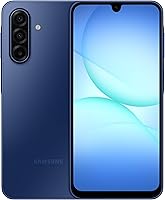
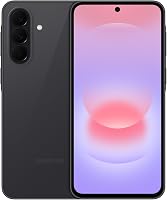
Is the Samsung Galaxy A17 a Good Phone?
The Samsung Galaxy A17 5G is a good phone for everyday use if you want an AMOLED screen, room for photos, and long software support. Choose another model if compact size, demanding games, or stronger water protection comes first.
On this page (9 sections)
- Is the Samsung Galaxy A17 a good phone for everyday use?
- What makes the A17 worth keeping for several years?
- How much storage should you plan for?
- What should you know about charging and daily use?
- Is the Galaxy A17 good for photos and video?
- How much protection does the A17 provide?
- Which alternative fits your priorities better?
- What should you check before buying and setting up the A17?
- Should you buy the Samsung Galaxy A17?
The Samsung Galaxy A17 5G is a good phone for everyday use if you want a large screen, room for photos, and long software support. It's a sensible choice for calls, messages, maps, browsing, and watching videos.
Choose it for those needs rather than expecting a phone built around demanding games or underwater protection. Before buying, settle 3 questions: does its size suit you, will your carrier accept the exact model, and do its camera features cover your needs?
Is the Samsung Galaxy A17 a good phone for everyday use?
Yes, the Galaxy A17 makes sense for routine phone tasks and viewing content. Its 6.7-inch FHD+ Super AMOLED display gives you plenty of room for text, photos, recipes, and video calls.
A large display can help when you increase text size, but it also means more phone to carry and hold. If you often use a phone one-handed, compare its fit with your current device before choosing.
The A17 is less clearly suited to buyers whose main task is demanding gaming or heavy multitasking. If that's you, make app performance a buying requirement and compare model-specific performance evidence before committing.
For a closer look at its features and tradeoffs, read our Samsung Galaxy A17 5G review. If you're comparing Samsung models, see our guide to the best Samsung phones.
What makes the A17 worth keeping for several years?
Samsung's promised software support is the main reason to consider the A17 for long-term use. Samsung promises 6 OS upgrades and 6 years of security updates, counted from the date of global manufacture.
That starting point matters: buying the phone later doesn't restart the support period. Check how much of that window remains if you plan to keep your next phone for several years.
Updates also need your attention after setup. Turn on automatic downloads where available, leave enough free storage for installation, and restart when an update requires it.
A support promise doesn't cover every part of phone ownership. Battery wear, accidental damage, and changing app needs can still affect how long a device suits you.
How much storage should you plan for?
The A17's 128GB of built-in storage is a starting point for apps and files, with some space already used by software. It supports microSD expansion up to 2TB, and the card is sold separately.
Before moving from your old phone, open its storage settings and check what takes up space. Apps and downloaded games call for different planning than a large folder of photos.
A memory card is useful for supported photos, videos, and other files, but don't assume every app can move onto it. Check storage options within the apps you rely on.
Buy a card around your actual collection rather than choosing the largest capacity by default. Keep another copy of important photos, because extra storage inside the phone isn't a backup if the phone is lost.
What should you know about charging and daily use?
The A17 has a 5,000mAh battery, and its Super Fast Charging requires a compatible 25W charger sold separately. A USB cable comes with the phone, so check your wall adapter before ordering another accessory.
Battery capacity isn't a daily schedule. Brightness, weak cellular signal, navigation, video calls, and background activity all affect how soon you'll need to charge.
After the first few days, check battery settings for apps using power you don't expect. Reduce needless background activity before turning off features you use throughout the day.
Keep the phone out of direct sun while charging and use Samsung-approved charging equipment. Replace worn cables, and avoid trapping the phone under bedding or other materials that hold heat.
Is the Galaxy A17 good for photos and video?
The A17 is a reasonable choice for casual snapshots, with a triple-lens camera system aimed at subjects such as family groups and close-ups. If photos are your main reason to upgrade, compare sample images before buying.
Choose examples that match your life. Indoor family photos, pets in motion, and evening scenes tell you more about your needs than a bright outdoor landscape alone.
You can improve everyday results with simple habits: wipe the lens with a clean microfiber cloth, use available light, and pause briefly before taking the shot. Move closer when practical instead of relying on heavy digital zoom.
For video, record a short clip and check its sound and framing before an important event. Back up the finished files promptly rather than leaving your only copy on the phone.
How much protection does the A17 provide?
The A17's IP54 protection covers limited dust exposure and fresh-water splashes under laboratory conditions. Samsung advises against beach or pool use, so keep it away from submersion and heavy water exposure.
Its front uses Gorilla Glass Victus, and its back uses Glass Fiber Reinforced Polymer. Add a well-fitting case if drops are a concern, and choose one that leaves the camera and charging port clear.
Is the Galaxy A17 a good phone for outdoor use?
It's suitable for ordinary daily outings if you keep its water limits in mind. For work or hobbies involving frequent water exposure, choose protection around that situation rather than assuming a case makes the phone waterproof.
Keep grit away from the screen and charging port, and clean the phone gently. If it gets wet, follow Samsung's drying guidance before plugging it in.
Which alternative fits your priorities better?
Choose the A17 for everyday use, the A37 for added camera tools and stronger water protection, or the Moto G for speaker use and wired headphones. Each choice answers a different need.
Galaxy A17 5G: for everyday Samsung buyers
The A17 suits someone replacing an older phone who wants familiar daily tasks, photo storage, and a clear software support commitment. It's also a useful shortlist option when screen space matters more than pocket size.
Skip it if a small phone is your first requirement. Buyers focused on demanding games should compare performance evidence before making it their pick.
Galaxy A37 5G: for camera tools and water protection
The A37 suits buyers who want IP68 protection and more camera features. Its 50MP HDR main camera, Nightography, Object Eraser, and Edit Suggestion give you specific reasons to consider stepping up.
Its Exynos 1480 processor also makes it worth comparing if gaming or multitasking drives your choice. Skip the step up if those needs don't apply; its large screen won't solve a preference for a smaller phone.
Moto G 2025: for speaker use and wired headphones
The Moto G suits buyers who watch clips without headphones or want a 3.5mm headphone jack. Its US model supports major US carriers, though checking the exact device with your carrier remains a useful final step.
It has 4GB of physical RAM; RAM Boost uses internal storage as virtual memory. Don't read the advertised combined amount as physical RAM, and skip this model if an AMOLED display is a firm requirement.
For broader comparisons across affordable Android models, see our best budget Android phones.
What should you check before buying and setting up the A17?
Confirm carrier acceptance for the exact phone before moving your number or paying for accessories. The word “unlocked” doesn't settle every compatibility question.
Use your carrier's device checker when an IMEI is available, and confirm the activation method it requires. Our guide to buying an unlocked phone that works in the US explains those checks.
Before setup, back up your old phone and confirm that you can access your main email account. Save recovery codes for important accounts so a missing text message or old device doesn't interrupt the move.
Connect to Wi-Fi, install available updates, and set a screen lock before adding payment cards. Samsung Wallet supports compatible cards from participating banks, so check with your card issuer before relying on it.
Make a call, send a message, and use mobile data before wiping the old phone. Then check your contacts, photos, and essential apps; our first-time unlocked phone setup guide walks through the move.
Should you buy the Samsung Galaxy A17?
The Samsung Galaxy A17 is a good phone to choose when daily tasks, photo storage, and years of software support match your priorities. Confirm carrier compatibility and screen size first, then budget for any charger, card, or case you need.
Choose the A37 if its water protection and camera tools solve a real need, or the Moto G if speakers and wired headphones matter more. For the final A17-specific checks, read our Galaxy A17 5G review.
Frequently asked questions
Is the Samsung Galaxy A17 5G good for everyday use?
Yes, the Galaxy A17 5G is a good fit for calls, messages, browsing, and viewing content; its large AMOLED screen and storage expansion suit those tasks, while Samsung's promised software support helps long-term buyers. Choose based on those strengths; demanding games need a separate performance comparison.
Does the Galaxy A17 5G have enough storage?
Its 128GB of built-in storage suits buyers who manage their apps and downloads, and a separate microSD card can add space for files. Software uses some built-in capacity, so you won't have the full amount free; don't assume a memory card can hold every app or replace a backup.
Is the Samsung Galaxy A17 5G water resistant?
Yes, the Galaxy A17 5G has IP54 protection against limited dust exposure and splashes of fresh water under laboratory conditions. It isn't suitable for submersion, and Samsung advises against beach or pool use; keep it dry during cleaning and follow Samsung's care guidance before connecting a charging cable.
Should I choose the Galaxy A17 5G or Galaxy A37 5G?
Choose the Galaxy A17 5G for everyday phone tasks, expandable photo storage, and Samsung's promised update support; choose the Galaxy A37 5G if its stronger water protection and added camera tools address a specific need. Both have large screens, so neither solves a preference for a smaller phone.