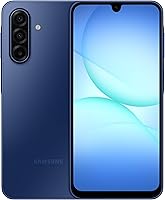
Is the Google Pixel 10a Worth Buying?
The Google Pixel 10a is worth buying if you want Google's camera tools, Gemini, and a bright screen in an unlocked Android phone. Choose a Samsung alternative if expandable storage or a confirmed 6.7-inch display matters more.
On this page (8 sections)
- Who should buy the Google Pixel 10a?
- What makes the Google Pixel 10a worth buying?
- When is the Galaxy A17 5G the better choice?
- Is the Galaxy A37 5G a stronger alternative?
- Will an unlocked Pixel 10a work with your carrier?
- How should you set up your new phone?
- Which charging and care mistakes should you avoid?
- Is the Google Pixel 10a worth buying for you?
The Google Pixel 10a is worth buying if you want Google's camera tools, Gemini, and a screen built for outdoor visibility in an unlocked Android phone. Skip it if those features solve no problem with your current phone.
The strongest reason to choose it is a useful mix of photo guidance, everyday assistance, and flexible carrier choice. The Samsung Galaxy A17 5G and Galaxy A37 5G suit different priorities, especially keeping more files locally or reading on a large screen.
Who should buy the Google Pixel 10a?
Buy the Pixel 10a if camera guidance and everyday convenience matter more than building a large offline media library. It has 128GB of storage, wireless charging, and both fingerprint and facial recognition.
That combination suits someone who takes family photos, uses maps and messages, and wants help planning small tasks. Wireless charging also gives you another way to charge at a desk or bedside, provided you have a compatible charger.
Google says the battery lasts more than 30 hours on a full charge. Treat that as a planning reference, since navigation, video calls, screen brightness, and weak cellular reception all affect time between charges.
When the Google Pixel 10a is worth buying as an upgrade
The Pixel 10a is worth buying when its features address a daily annoyance. A hard-to-read outdoor screen, a worn battery, or a desire for guided photography gives you a clearer reason to upgrade than curiosity about AI alone.
Write down the 2 things you most want your next phone to improve. If your current phone still handles both well, keeping it may be the better decision.
If you're buying for a parent, start with readability, call handling, and familiar controls. Our guide to choosing an Android phone for a parent helps turn those needs into a practical checklist.
What makes the Google Pixel 10a worth buying?
The Pixel 10a stands out for outdoor visibility, Camera Coach, and built-in Gemini. These are reasons to choose it when you expect to use them regularly.
Google specifies a 3,000-nit peak brightness for the Actua OLED display. Peak brightness isn't a setting the screen holds at all times, so don't use that number to predict battery life.
Camera Coach makes the phone worth considering if you want guidance while taking pictures. Regardless of phone choice, clean the lens, face your subject toward available light, and avoid heavy digital zoom when you can move closer.
Gemini can help with planning and brainstorming, including meal ideas. Google also offers spam-call screening, which is a more concrete benefit if unwanted calls often interrupt your day.
Before buying for AI alone, name a task you'd actually hand to an assistant. Check suggested dates, messages, and other details before acting on them, and avoid sharing sensitive information unless you understand the privacy settings.
When is the Galaxy A17 5G the better choice?
Choose the Galaxy A17 5G if a large screen and expandable storage are your main needs. Its 6.7-inch Super AMOLED display suits recipes, video calls, and reading with larger text.
It supports microSD expansion up to 2TB, with the card sold separately. That makes it a practical option for keeping photos, downloaded media, and documents on the phone.
A memory card adds file space, but don't assume every app can move to it. Keep a separate backup of important photos because a card inside your phone can be lost along with the phone.
Samsung promises 6 OS upgrades and 6 years of security updates from the date of global manufacture. The clock doesn't begin when you buy it, which matters if you plan to keep the phone for several years.
The A17 has IP54 protection against fresh-water splashes and limited dust exposure. Skip it if stronger water protection is a deciding factor; Samsung advises against beach or pool use.
For wider differences in software and features, read Pixel vs Samsung: which Android phone is better?. Choose the interface and tools you'll use rather than switching brands for a feature you may ignore.
Is the Galaxy A37 5G a stronger alternative?
Choose the Galaxy A37 5G if a large display and Samsung's photo editing tools lead your wish list. It pairs a 6.7-inch Super AMOLED screen with a triple-lens camera system and a 50MP HDR main camera.
Samsung offers Nightography for automatic low-light capture, plus Object Eraser, My Filter, and Edit Suggestion. This suits someone who wants to adjust family pictures after taking them.
The A37 uses an Exynos 1480 processor and has IP68 water and dust protection. Samsung also promises 6 OS upgrades and 6 years of security updates.
Skip it if your main reason for choosing it is the megapixel count. That number alone can't settle image quality, and Samsung's low-light claims don't establish a camera winner against the Pixel.
Large screens also deserve a fit check. Consider pocket space, grip, and reaching controls with one hand before choosing either Samsung for its screen size.
Will an unlocked Pixel 10a work with your carrier?
The Pixel 10a supports Google Fi, Verizon, T-Mobile, AT&T, and other major carriers, but confirm activation for your exact plan before buying. Carrier support and moving your existing number are separate checks.
The phone supports a Nano SIM and eSIM for dual SIM use. Our guide to SIM cards and eSIMs on unlocked phones explains which activation route may suit your move.
Ask your carrier whether you can reuse your current SIM or need a new SIM or eSIM. If you're leaving another phone, our guide to how to check if your phone is unlocked helps you assess that device's status.
For the broader distinction between phone access and service, read what an unlocked phone means. Verizon customers can also check our guide to using an unlocked phone with Verizon.
How should you set up your new phone?
Set up the phone over Wi-Fi and confirm your calls, messages, and account access before erasing the old one. Keeping both phones available makes it easier to catch missing files or sign-in steps.
Start by backing up contacts, photos, and any files that exist only on your old device. Make sure you know your Google account password and can reach your recovery email or phone number.
During the move, pay special attention to banking apps and authenticator apps. Some require their own transfer or sign-in process even when other apps copy across.
After activation, place a call, send a message, and use mobile data with Wi-Fi turned off. Check voicemail too, then confirm that your important photos and contacts arrived.
Finally, install available system and app updates, set a screen lock, and adjust text size. Try the camera and any assistant features you want before adding lots of optional apps.
Which charging and care mistakes should you avoid?
Avoid heat, damaged charging gear, and treating water resistance as permission to get the phone wet. Those habits matter more than chasing a perfect daily charging routine.
The Pixel has scratch-resistant Gorilla Glass 7i and IP68 protection, but protective glass can still scratch or break. Use a case that fits the exact model and keep the phone away from sand and loose keys.
Keep charging ports dry and clear of debris. Let a wet phone dry according to its care instructions before connecting a cable, and don't push metal objects into the port.
For Samsung fast charging, budget for suitable charging equipment rather than assuming a USB cable provides the advertised speed. The A17's 25W charger and the A37's 45W charger are sold separately.
Avoid leaving any phone charging in direct sun or inside a hot car. If battery use seems unusually high, check screen brightness and background app activity before deciding the battery is the problem.
Is the Google Pixel 10a worth buying for you?
The Google Pixel 10a is worth buying if Camera Coach, Gemini, outdoor visibility, and wireless charging match how you'll use your next phone. Choose it because those features help with your day, rather than expecting every feature to matter equally.
Pick the Galaxy A17 5G for a large screen and a clearly stated microSD expansion limit. Choose the Galaxy A37 5G if Samsung's editing tools and large display better fit your photo habits.
Keep your current phone if it still meets your needs and none of these differences solves a real problem. For more detail before deciding, read our Google Pixel 10a review.
Once you've chosen, confirm carrier support and follow how to use an unlocked phone for the move.
Frequently asked questions
Is the Google Pixel 10a worth buying?
The Google Pixel 10a is worth buying if Google's camera tools, Gemini, and outdoor screen visibility match your daily needs. Its unlocked carrier support and wireless charging add useful flexibility; choose a Samsung alternative if storing a large local photo collection or having a 6.7-inch display matters more.
Does the Google Pixel 10a work with major US carriers?
Yes, the unlocked Google Pixel 10a works with Google Fi, Verizon, T-Mobile, AT&T, and other major carriers. Before buying, confirm that your carrier accepts the exact phone for your plan and ask how to activate your physical SIM or eSIM; keep your current service active during the move.
Is the Pixel 10a better than the Galaxy A17 5G?
Choose the Pixel 10a for Google's camera guidance, Gemini, and wireless charging. Choose the Galaxy A17 5G for its 6.7-inch Super AMOLED display and microSD expansion up to 2TB; the A17 also has Samsung's promise of 6 OS upgrades and 6 years of security updates from global manufacture.
Should I choose the Pixel 10a or Galaxy A37 5G?
Choose the Pixel 10a if Camera Coach and Gemini are the tools you want to use. Choose the Galaxy A37 5G if you prefer Samsung's photo editing tools and a 6.7-inch display; its 50MP HDR main camera is another reason to compare, but megapixels alone don't establish photo quality.