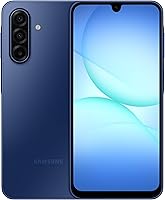
Pixel vs Samsung: Which Android Phone Is Better? (October 2026)
For pixel vs samsung, choose Pixel 10a for Google assistant tools, Galaxy A17 5G for a large local media library, or Galaxy A37 5G for Samsung photo tools and stronger water protection.
On this page (11 sections)
- Pixel vs Samsung: which should you choose?
- How do these Pixel and Samsung models compare?
- Which display suits reading, video and outdoor use?
- Which phone makes sense for a large photo and video library?
- Which battery and charging features matter in daily use?
- Which phone is better for spills, dust and everyday care?
- Which software and AI tools will you actually use?
- How long can you plan to keep each phone?
- Will an unlocked Pixel or Samsung work with your carrier?
- How should you set up your new phone?
- Pixel vs Samsung: which is better for you?
For pixel vs samsung, choose the Pixel 10a for Google assistant tools, the Galaxy A17 5G for a large local media library, or the Galaxy A37 5G for Samsung photo editing tools and stronger water protection.
These are specific model choices, not a verdict on every phone from either brand. Start with what your current phone makes difficult, then choose the model that solves that problem.


Pixel vs Samsung: which should you choose?
Choose Pixel for Google-centered help, the Galaxy A17 for offline storage, or the Galaxy A37 for photo editing and water protection. A feature you use every day deserves more weight than one you might try once.
The Pixel 10a fits someone who wants help planning tasks, handling unwanted calls or learning camera features. Skip it if your main goal is a large removable media library without first resolving your storage needs.
The Galaxy A17 fits people who keep family videos, music and documents available without relying on a connection. Skip it if water exposure is a major concern or your main reason for switching is more advanced photo editing.
The Galaxy A37 fits buyers who want Samsung’s large-screen format with more camera tools. Skip it if calls, messages and occasional photos cover your needs and the A17 already meets your requirements.
Write down your 2 most important jobs before comparing extras. “Read recipes without squinting” and “keep travel videos offline” are more useful buying goals than “get the most features.”
How do these Pixel and Samsung models compare?
The main differences are storage flexibility, assistant tools, camera features and protection. All 3 versions here have 128 GB built-in storage, so that number alone does not separate them.
| Product | Best for | Display | Storage | Durability | Our score |
|---|---|---|---|---|---|
| Google Pixel 10a | Google assistant users | OLED, 1080 x 2424 pixels | 128 GB | IP68 water and dust protection | 8.6 |
| Galaxy A17 5G | offline media collectors | 6.7-inch Super AMOLED | 128 GB, expandable up to 2 TB | IP54 splash and dust resistance | 8.0 |
| Galaxy A37 5G | family photo editing | 6.7-inch Super AMOLED | 128 GB | IP68 water and dust protection | 7.9 |
Our recommendations focus on which buyer each phone serves. The A17’s storage flexibility can matter more to a media collector than a higher overall score.
For a replacement phone, look at your current storage use and the apps you open most. If photos occupy most of your space, solve that need before choosing based on an assistant or camera mode.
Also separate essential features from convenient extras. Carrier compatibility is essential; a photo filter is useful only if you expect to use it.
Which display suits reading, video and outdoor use?
Choose either Samsung for a known 6.7-inch Super AMOLED screen; consider the Pixel’s display if outdoor visibility is a priority. Google claims up to 3,000 nits peak brightness, while Samsung claims up to 1,900 nits for the A37.
Both Galaxy screens measure 6.5 inches when accounting for rounded corners. Their camera cutouts also reduce the usable viewing area, so diagonal size is only part of how spacious a screen feels.
The Pixel has an OLED display with a resolution of 1080 x 2424 pixels. Confirm its diagonal size before choosing it specifically for a larger or smaller phone.
For reading, increase text size and check whether an app still shows enough content. Larger text can help more than a small difference in resolution.
For one-handed use, try a phone with a similar size and a case before buying. Reaching the top of the screen, holding it during calls and fitting it in your pocket all matter.
Peak brightness is useful for brief outdoor viewing, but it does not mean the screen runs at that level throughout the day. Avoid choosing from the brightness number alone.
Is Pixel or Samsung better for photos?
Choose Pixel for Camera Coach, the A17 for straightforward family photos, or the A37 for its named capture and editing tools. Camera features help identify the right workflow, but they do not establish an image-quality winner.
The A17 has a triple-lens system for wide family photos and close-ups. It suits a buyer whose main goal is recording everyday moments without making editing a hobby.
The A37 adds a 50MP HDR main camera and Nightography, which Samsung says captures low-light photos and videos automatically. My Filter, Object Eraser and Edit Suggestion give you more ways to adjust images afterward.
Megapixels do not tell you how faces, movement or dim rooms will look. If photos drive the purchase, compare sample images from the exact models in the situations you photograph most.
For better results with any phone, wipe the camera lens with a clean microfiber cloth and move closer when practical. A fingerprint on the lens can spoil a family photo regardless of the camera system.
Keep an original copy before making major edits. Check faces, text and background details after using tools that remove or change parts of a photo.
Which phone makes sense for a large photo and video library?
The Galaxy A17 is the clearest choice for removable storage, with microSD support up to 2 TB. The card is sold separately, and some built-in space is already used by the phone’s software.
Check your current phone’s storage breakdown before ordering. Someone using little space for a few apps has different needs from someone carrying years of videos and offline downloads.
A memory card can help with media and files, but do not assume every app can move to it. Check the storage options inside your camera, download and media apps during setup.
The A37 includes expandable memory among its features, but confirm the supported capacity before buying a card. Resolve the Pixel’s expansion options before choosing it for a library that already strains your current phone.
Extra storage also needs a backup plan. A card can be lost or fail, so keep irreplaceable photos in another location and confirm you can open the copied files.
Cloud storage can reduce what you keep locally, but consider your connection and account limits. Download important travel documents before leaving home rather than depending on access during a trip.
Which battery and charging features matter in daily use?
Choose the Pixel for wireless charging convenience, or match either Samsung with the right charger for its charging system. There is no sound battery-life ranking here because the supplied runtime figures do not share a common measurement method.
Google claims more than 30 hours from a full charge for the Pixel. Actual use changes with screen brightness, signal strength, navigation, video calls and other demands.
The A17 supports Super Fast Charging with a separately sold 25W charger. The A37 supports Super Fast Charging 2.0 with a separately sold 45W charger.
A higher charger wattage does not translate directly into the same increase in charging speed. Samsung notes that battery level and other factors affect the result.
Check what charging equipment you already have before ordering accessories. Use Samsung-approved chargers and cables for these Galaxy models, and replace cables with damaged insulation or loose connectors.
Avoid leaving a charging phone under bedding or in direct sun. If it gets unusually hot, stop charging and let it cool before investigating the cause.
Which phone is better for spills, dust and everyday care?
Choose the Pixel or A37 when stronger water and dust protection matters. Both have IP68 protection, while the A17 has IP54 resistance to fresh-water splashes and limited dust ingress.
The Pixel uses scratch-resistant Gorilla Glass 7i, the A17 has a Gorilla Glass Victus front, and the A37 uses Gorilla Glass Victus+. The A17 also has a Glass Fiber Reinforced Polymer back.
These materials do not remove the need for a case. Choose one that leaves the charging port clear and provides a secure grip, especially if you often carry the phone with other items.
Samsung advises against beach or pool use for the A17. Treat water resistance as protection against accidents, and follow the care instructions for the exact model.
Keep sand away from the screen and case edges, where it can rub against surfaces. Use a soft cloth for routine cleaning and avoid spraying liquid directly into openings.
After a spill, disconnect accessories and follow the phone’s drying guidance before charging. Do not use heat or push objects into the port to hurry the process.
Which software and AI tools will you actually use?
Choose Gemini on Pixel for assistant tasks, or Samsung’s tools if visual search and model-specific extras fit your routine. Start with a real task you repeat rather than buying for the broad promise of AI.
Google describes Gemini as a built-in assistant for planning, creating and brainstorming. The Pixel also offers spam call screening, which is a separate practical reason to consider it.
Both Samsung models include Circle to Search. On the A17, it requires an internet connection, and results depend partly on the clarity and framing of the image.
The A17 also includes Samsung Wallet for compatible cards and memberships, plus Samsung TV Plus. Check your bank’s support before expecting a payment card to work.
On the A37, the photo editing tools are the more relevant draw for someone organizing family pictures. If you rarely edit photos, those tools should carry less weight in your decision.
Review permissions as you enable assistant, calling and payment features. Verify any generated message, calendar detail or suggested information before acting on it.
How long can you plan to keep each phone?
Samsung promises 6 OS upgrades and 6 years of security updates for both Galaxy models. Confirm the Pixel 10a’s update policy before comparing how long you can keep each phone supported.
For the A17, Samsung counts support from the date of global manufacture. Buying later does not restart the clock, so check the remaining support period for a long-term purchase.
OS upgrades add or change system features, while security updates address security issues. Keep automatic updates enabled where practical and restart when an installation requires it.
Long ownership also depends on your storage needs and willingness to maintain backups. A phone that fits your apps today should leave room for the files and services you expect to add.
For other models, see our guides to the best Samsung phones and the best Motorola phones. Our Pixel 10a buying guide goes deeper on that Google option.
Will an unlocked Pixel or Samsung work with your carrier?
The unlocked Pixel 10a works with Google Fi, Verizon, T-Mobile, AT&T and other major carriers. Check the exact Samsung model with your carrier before buying or moving service.
An unlocked phone gives you carrier choice, but it does not remove every activation requirement. Our guide to what an unlocked phone means explains that distinction.
Ask your carrier to confirm the model, plan and activation method. The Pixel supports a single nano SIM and eSIM, but confirm how your carrier handles the setup you need.
Do not cancel your old line before arranging a number transfer. Keep access to your old phone and account until calls, messages and account recovery work on the replacement.
Use our unlocked phone guide for the broader checks. The step-by-step guide to buying an unlocked phone that works in the US helps you check compatibility before ordering.
How should you set up your new phone?
Back up first, transfer second and erase the old phone last. Keep both phones charged and allow time to check essential apps before relying on the new device.
Confirm that contacts and photos have copied, then open a few files to check them. Move authenticator apps and recovery methods carefully, since a photo backup does not preserve every sign-in tool.
Install system and app updates before setting up payment or work services. Add a screen lock, review notification previews and store recovery codes somewhere separate from the phone.
Make a call, send a message and try mobile data with Wi-Fi off. This catches activation problems while you still have your old device available.
Set text size, volume and shortcuts around your daily needs. Our guide to using an unlocked phone for the first time covers the next steps after activation.
Pixel vs Samsung: which is better for you?
Pick the Pixel 10a if assistant help and wireless charging fit your routine, the Galaxy A17 if local media storage is your main need, or the Galaxy A37 if you want Samsung’s photo tools with stronger water protection.
Before ordering, confirm carrier acceptance, storage capacity and the charger you need. Those checks turn a pixel vs samsung preference into a phone you can use comfortably from the first day.
If none solves your main problem, compare our best budget Android phones before choosing a brand.
Sources
Frequently asked questions
Is Pixel better than Samsung?
Pixel is the better fit here for Google assistant tools and wireless charging, while Samsung offers a choice between media storage and photo editing priorities. Choose the Pixel 10a for Gemini, the Galaxy A17 5G for microSD storage, or the Galaxy A37 5G for its camera and editing features.
Which has the bigger screen, Pixel or Samsung?
Both Samsung models here have 6.7-inch screens; confirm the Pixel 10a’s diagonal measurement before making a size comparison. Samsung measures across the full rectangle, with 6.5 inches accounting for rounded corners, and less actual viewable area because of the corners and camera cutout.
Which has more storage, Pixel or Samsung?
The Galaxy A17 5G is the clearest choice for a large local library because it supports a separately sold microSD card up to 2 TB. All 3 versions here have 128 GB built in, but extra card space should not be assumed to work like internal storage for every app.
Do Pixel and Samsung phones work with the same carriers?
The unlocked Pixel 10a works with Google Fi, Verizon, T-Mobile, AT&T and other major carriers. Check the exact Samsung model with your carrier before ordering, including activation and SIM requirements; our guide to unlocked Android phones explains the checks that matter before switching.
Which gets longer software support, Pixel or Samsung?
Samsung promises 6 OS upgrades and 6 years of security updates for both Galaxy models, but confirm the Pixel 10a’s policy before ranking support length. The A17’s support period starts at global manufacture, so a later purchase does not begin a fresh 6-year period.