Motorola Moto G Stylus Review: Worth It? (October 2026)
This Moto G Stylus review recommends the 2024 model for everyday pen use and its OIS camera. Choose the 2025 model if you keep more files, want a sharper screen or need IP68 water resistance.
On this page (9 sections)
- Moto G Stylus review: who should buy each model?
- Moto G Stylus 2024 vs 2025: what changes your decision?
- How useful is the built-in stylus for notes and drawing?
- Which screen and camera differences matter in daily use?
- How much storage and RAM do you need?
- What should you know about charging and water protection?
- When should you choose another Moto G phone?
- How do you check carrier support and set up the phone?
- Moto G Stylus review: which phone should you choose?
The Moto G Stylus is worth buying if you'll regularly use its built-in pen, and this Moto G Stylus review favors the 2024 model for everyday notes and its OIS camera. Choose the 2025 version if you save more files, want a sharper screen or need stronger water protection.
The pen is the reason to start here. If you mainly type messages and watch videos, the Moto G Power and standard Moto g alternatives deserve a look before you decide.
Moto G Stylus review: who should buy each model?
Choose the 2024 Stylus for short handwritten tasks, or the 2025 Stylus for more room to keep your work and media. Both let you jot notes, sketch and make photo edits without carrying a separate pen.
Moto G Stylus review verdict for everyday note takers
The 2024 model suits people who write shopping lists, mark up ideas or make quick sketches between other tasks. Its camera includes optical image stabilization, making it worth considering if photos are another regular part of your day.
Moto G Stylus 2024
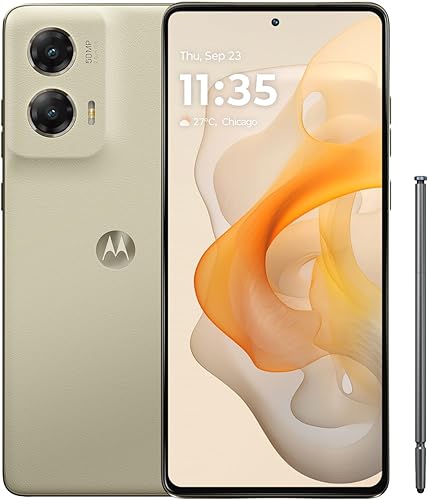
- Built-in stylus
- 6.7-inch pOLED display
- 50MP camera with OIS
- 128GB storage
Choose this model for everyday notes, sketches and a camera with optical image stabilization. It suits buyers who don't keep a large library of videos and downloads.
Pros
- Pen stays with the phone
- Camera includes OIS
- Dolby Atmos and stereo speakers
- Soft vegan leather finish
Cons
- Less built-in storage than the 2025 Stylus
- Lower screen resolution than the 2025 Stylus
Keep this model on your shortlist if your current phone has plenty of free storage and you mainly save short notes rather than long videos. Its lower screen resolution matters less if you use larger text and rarely inspect fine image detail.
Skip it if you already struggle to make room for apps and downloads. Moving the same crowded collection to another phone with similar capacity leaves you managing the same problem.
Who should choose the newer Stylus?
The 2025 model fits people who keep travel downloads, family videos, photo edits and several apps on the phone. Its higher-resolution screen also gives readers and image viewers another reason to choose it.
Moto G Stylus 2025
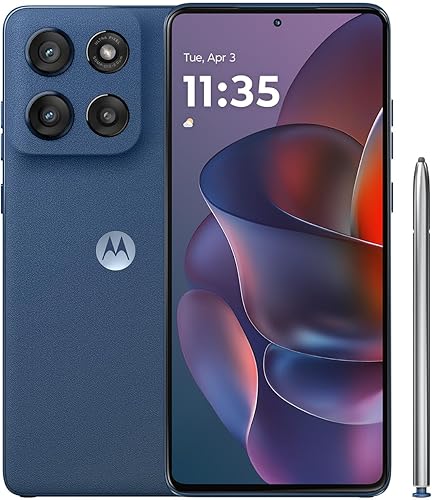
- Built-in stylus
- 6.7-inch Super HD pOLED
- 256GB storage
- IP68 water resistance
The stronger fit for people who keep lots of photos, downloads and creative files. Its sharper screen and water resistance add practical reasons to choose it beyond storage.
Pros
- More room for local files
- Higher-resolution Super HD pOLED screen
- IP68 water resistance
- Compatible with major US carriers
Cons
- Maximum charging speed needs a separately sold Motorola TurboPower 68W charger
- Water resistance decreases with wear
Water resistance is useful for accidental exposure, but it shouldn't replace careful handling. Skip this model if your current phone already covers your needs and none of its storage, screen or protection features would change how you use it.
For a wider shortlist, compare the best Motorola phones. Our Moto G Power guide is the closer next read if entertainment matters more than handwriting.
Moto G Stylus 2024 vs 2025: what changes your decision?
The 2025 model adds storage, screen resolution and faster supported charging. The 2024 model pairs its pen with an OIS camera and a lower-resolution screen of the same size.
| Feature | Moto G Stylus 2024 | Moto G Stylus 2025 |
|---|---|---|
| Display | 6.7-inch pOLED, 2400 x 1080 | 6.7-inch Super HD pOLED, 2712 x 1220 |
| Rear camera | 50MP with OIS | 50MP Sony LYTIA camera system |
| Built-in storage | 128GB | 256GB |
| Physical RAM | 8GB | 8GB |
| Stylus | Built in | Built in |
| Finish | Vegan leather | Vegan leather |
| Battery capacity | 5000mAh | 5000mAh |
| Maximum wired charging | 30W TurboPower | 68W TurboPower |
| Water protection | Not a reason for choosing it here | IP68 water resistance |
The newer phone adds pixels rather than more screen area. Choose it for finer detail, but don't expect a larger writing surface simply because the screen has a higher resolution.
The shared battery capacity doesn't establish equal runtime. Signal strength, screen settings, apps and time spent recording or streaming all affect how often you'll need to charge.
How useful is the built-in stylus for notes and drawing?
The pen is most useful for brief notes, rough sketches and precise edits. Think of tasks you already do, such as writing a reminder, circling part of a photo or outlining an idea.
For long meeting notes, decide where those notes will live before choosing the phone. An app that saves and organizes your work matters more than filling the phone with several note apps you rarely open.
If you need searchable handwriting, pressure-sensitive brushes or a specific export format, confirm support in your preferred app and phone combination. A built-in pen doesn't establish support for every advanced drawing feature.
Small screens also place a practical limit on page layout. People who draw detailed plans or write full pages may prefer a larger device for that work, even if a phone pen remains useful for quick changes.
Return the stylus to its storage slot after each task. Keeping it with the phone is the main convenience, and a consistent habit reduces the chance of leaving it on a desk or in a bag.
Which screen and camera differences matter in daily use?
Choose the 2025 Stylus for higher screen detail, and consider the 2024 model if camera stabilization is a priority. Screen size and megapixel count alone won't settle the choice.
Higher resolution is most relevant when you view small text, detailed images or dense pages. If reading feels cramped, increasing text size can be more useful than keeping everything small to fit more on the screen.
Both Stylus phones have Dolby Atmos and stereo speakers. That makes audio a shared feature rather than a strong reason to choose one generation over the other.
For photos, Motorola says the 2024 model's OIS helps with low-light shots and smoother video. Stabilization helps with camera movement, but it doesn't stop a moving child or pet from blurring.
Before an important photo, clean the camera glass with a soft cloth, find better light and hold the phone steady. Avoid relying on digital zoom when you can safely move closer.
The Sony LYTIA name on the newer phone doesn't prove better results for every scene. If camera quality leads your decision, compare sample images of the subjects you actually photograph.
How much storage and RAM do you need?
Choose more built-in storage if your current phone is nearly full. Check how much space your apps, photos and downloads use before deciding that a smaller capacity will be enough.
Leave room for app updates and new files rather than planning to fill every available gigabyte. The operating system and built-in software also take part of the advertised capacity.
If you regularly remove old downloads and back up photos, the smaller Stylus can fit that routine. People who want to keep large video collections locally have a clearer reason to choose the newer version.
RAM Boost uses internal storage as virtual memory. It isn't extra physical RAM, and a large combined RAM figure shouldn't be read as the amount of physical memory inside the phone.
Don't delete your only copy of a photo to free space. Check that your backup opens correctly on another device before removing the original.
What should you know about charging and water protection?
Choose your charger around the phone's supported requirements, and treat water resistance as protection against accidents. Neither a larger charger number nor an IP68 label removes the need for care.
The 2025 Stylus needs a separately sold Motorola TurboPower 68W charger for its maximum rate. Motorola's claim of power for the day in 15 minutes also requires a substantially depleted battery and charge boost turned on.
Charging slows as the battery fills, so a short top-up and a nearly full battery won't charge at the same pace. Your own daily use may also need more power than Motorola's mixed-use estimate.
The newer Stylus's IP68 protection covers fresh-water immersion up to 1.5 meters for up to 30 minutes under controlled conditions. Resistance decreases with wear, and the phone isn't designed for use underwater.
Don't charge a wet phone or treat the protection as permission to expose it to salt water or other liquids. Drop protection also isn't a promise that the screen will survive a fall.
Use a case made for the exact model and year, with clear access to the pen slot. Clean the screen with a soft cloth and keep grit away from the stylus tip before writing.
When should you choose another Moto G phone?
Choose a pen-free alternative if handwriting won't be part of your routine. The Power model suits video watchers, while the standard Moto g suits simpler daily tasks with a less detailed screen.
Moto G Power 2025

- 6.8-inch display
- 120Hz maximum refresh rate
- 5000mAh battery
- Wireless charging
A pen-free alternative for watching videos, storing downloaded media and charging on a wireless pad. Choose it when entertainment matters more than handwriting.
Pros
- Larger screen with up to 120Hz refresh rate
- Wireless charging
- Camera includes OIS
- MicroSD support up to 1TB
Cons
- Less built-in storage than the 2025 Stylus
- Maximum wired charging speed needs a separately sold compatible charger
The Moto G Power 2025 has a 6.8-inch display with up to a 120Hz refresh rate, wireless charging and a camera with OIS. Its slightly larger screen suits people who spend more time watching than writing.
It supports microSD expansion up to 1TB, with the card sold separately. That helps with media storage, though some protected downloads can't move to a card.
Skip the Power if you want handwritten notes without carrying a separate accessory. Its maximum 30W wired charging also requires a compatible Motorola TurboPower charger, sold separately.
Moto g 2026

- 6.7-inch display
- 120Hz maximum refresh rate
- 5200mAh typical battery capacity
- 50MP camera
Consider this model for calls, messages, music and casual browsing when you don't need a pen. Its lower-resolution screen and smaller physical RAM capacity are the main compromises.
Pros
- Up to 120Hz refresh rate
- Larger typical battery capacity than the Stylus models
- Stereo speakers with Dolby Atmos
- Compatible with major US carriers
Cons
- Lower screen resolution than either Stylus model
- 4GB physical RAM
The Moto g 2026 suits calls, messages, casual browsing and music. It has a 5200mAh typical battery capacity, but capacity alone doesn't prove longer runtime than the other phones.
Its HD+ screen trades fine detail for a simpler display specification. A refresh rate up to 120Hz concerns motion, so it doesn't cancel out the lower resolution.
With 4GB of physical RAM, it isn't the first choice here for frequent switching among demanding apps. Skip it if detailed reading, photo work or pen input leads your shopping list.
Read Moto G vs Moto G Power for that closer choice. If you're weighing a move to another brand, the Pixel vs Samsung guide covers those alternatives.
How do you check carrier support and set up the phone?
Confirm carrier eligibility before moving your number, then keep your old phone available until the new one works. An unlocked phone still needs support from your carrier and plan.
The 2025 Stylus supports Verizon, AT&T, T-Mobile and other major US carriers. The 2024 model is unlocked and made for the US; confirm that exact version through your carrier's compatibility process.
Our guide to buying an unlocked phone that works in the US explains the checks. If you're keeping or passing on an existing device, use the guide to checking whether a phone is unlocked.
Back up the old phone and confirm access to your account passwords and recovery methods. Transfer your files over Wi-Fi, install available system updates and set a screen lock before adding sensitive information.
After activation, check calls, texts and mobile data with Wi-Fi turned off. Open your transferred photos and contacts, and confirm access to banking and sign-in apps before erasing the old phone.
Set up one note app and practice saving, finding and sharing a pen note. Our first-time unlocked phone setup guide covers the broader activation and setup process.
Moto G Stylus review: which phone should you choose?
Use this Moto G Stylus review to choose by the task you'll repeat most. Pick the 2024 Stylus for everyday pen use when your storage needs are modest, or the 2025 Stylus for a larger local file collection and finer screen detail.
Choose the Power if video viewing and wireless charging matter more than a pen. Choose the standard Moto g for basic daily tasks if you accept its lower-resolution screen and smaller physical RAM capacity.
Before ordering, settle the exact model, carrier approval and charger needs. If none of these fits your priorities, use our best Motorola phones guide to narrow the wider range.
Frequently asked questions
Is the Moto G Stylus 2025 better than the 2024 model?
The 2025 model is better suited to people who need more storage, a higher-resolution screen and IP68 water resistance. The 2024 model remains a useful choice for everyday notes and its OIS camera; choose by those differences rather than assuming a newer model is better for every buyer.
Does the Moto G Stylus have a built-in pen?
Yes, both the 2024 and 2025 Moto G Stylus include a built-in pen for notes, sketches, photo edits and phone navigation. That makes them useful for quick handwritten tasks without carrying another accessory; for detailed artwork, confirm that your chosen app supports the specific drawing tools you need.
Can the Moto G Stylus work with Verizon, AT&T and T-Mobile?
The Moto G Stylus 2025 supports Verizon, AT&T, T-Mobile and other major US carriers. The 2024 model is also unlocked and made for the US, but confirm its exact model with your carrier; check device eligibility, local coverage and activation requirements before transferring your number or changing your plan.
Does the Moto G Stylus 2025 include a fast charger?
The Motorola TurboPower 68W charger needed for maximum charging speed is sold separately; Motorola's short-charge claim requires a substantially depleted battery and charge boost turned on. Charging slows as the battery fills, so don't expect the same charging rate throughout a full session or from any USB charger.



