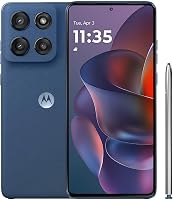
Motorola Moto G Play Review: Worth It? (October 2026)
Our Moto G Play review finds the 2024 model suits light everyday use when 4G service and modest app storage meet your needs. Choose a newer Moto G for 5G or the Moto G Stylus for its pen, sharper screen and camera stabilization.
On this page (9 sections)
- Moto G Play review: who should buy it?
- Is its screen good enough for reading and video?
- Will its storage fit your apps and photos?
- What should you expect from the camera?
- Is 4G enough, and will it work with your carrier?
- How do the other Motorola phones compare?
- How should you set up the Moto G Play?
- How can you avoid common storage and battery mistakes?
- Moto G Play review: which phone should you choose?
The Moto G Play 2024 is a basic phone for light daily use, and this Moto G Play review recommends it for calls, messages, browsing and occasional video. Skip it if you need 5G, install lots of large apps or want a sharper screen for reading.
Its appeal is a focused set of useful features rather than extras you'll rarely touch. Before buying, compare its limits with your current phone, especially how much app storage you use and where you need service.
Moto G Play review: who should buy it?
Buy the Moto G Play 2024 if your phone habits are simple and your carrier supports the exact model. It makes the most sense for someone who checks messages, follows directions, reads a few websites and watches occasional clips.
Its Snapdragon 680 processor and 4GB of RAM point toward light everyday tasks. For demanding games or frequent switching among large apps, choose based on stronger processing and physical memory rather than screen size alone.
Moto G Play 2024
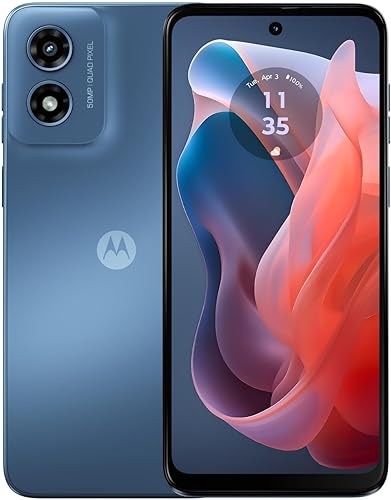
- Snapdragon 680 4G processor
- 6.5-inch HD+ display, up to 90Hz
- 64GB built-in storage
- 5000mAh battery
A basic Motorola for calls, messages, browsing and occasional video. Choose it when your carrier supports the exact model and you keep a modest number of apps.
Pros
- Stereo speakers with Dolby Atmos
- microSD expansion up to 1TB
- 5000mAh battery capacity
- 90Hz display option
Cons
- 4G rather than 5G
- 64GB built-in storage
- HD+ resolution
A backup phone is another reasonable use if it works with the service you plan to keep. Set it up before you need it, since an unused phone with expired account access is little help during a switch.
For a household member, match the phone to their habits rather than assuming everyone needs the same features. Someone who mainly calls family has different needs from someone who stores years of photos and installs every new app.
Who should skip the Moto G Play after this review?
Skip the Play if you already struggle with full internal storage, want 5G service or care strongly about display detail. Buying another phone with the same limit won't solve the problem that prompted your replacement.
The Moto G Power review covers another Motorola line. For a wider shortlist, use the best Motorola phones guide to compare models around the features you actually need.
Is its screen good enough for reading and video?
The Play's 6.5-inch HD+ display suits casual reading and video, while its lower resolution makes it less appealing for fine text and detailed images. Stereo speakers and Dolby Atmos give it useful audio features for watching without headphones.
The screen has a resolution of 720 x 1600 pixels and supports refresh rates up to 90Hz. Resolution controls how much detail fits on screen, while refresh rate affects how often the image can change.
Don't confuse smoother scrolling with sharper text. A higher refresh setting also doesn't make every video or game run at that rate, since apps, content and device settings affect it.
If small text is hard to read, increase font and display size during setup. Check a message thread, a map and a familiar website to see whether the result feels comfortable.
Screen size alone won't tell you how easy a phone is to hold. If possible, check your grip and thumb reach before choosing, especially if you usually carry the phone in a small pocket.
Will its storage fit your apps and photos?
The Play's 64GB internal storage suits a modest app collection, while microSD expansion up to 1TB gives supported media files more room. Some internal space is already used by Android and other software.
Start by opening the storage settings on your current phone. Separate space used by apps from photos, videos, downloads and offline music before deciding whether a card will solve your problem.
A microSD card can help with files, but it doesn't turn the phone into one with more internal storage. Don't plan around moving every app to the card, since app support and storage behavior vary.
If apps already fill most of your current phone, choose more internal capacity from the start. Leaving room for app updates and temporary files is easier than repeatedly deleting things to finish an update.
For a large media collection, use folders and remove downloads you no longer need. Keep a separate backup of important photos, since a memory card can fail or disappear with the phone.
What should you expect from the camera?
The Play's camera is a casual-photo option, with a 50MP rear sensor that combines 4 pixels into 1 for an effective resolution of 12.5MP. Motorola says its Quad Pixel design improves light sensitivity.
That makes the large sensor number a poor shortcut for comparing cameras. Focus instead on your usual subjects, such as still objects, indoor family scenes or people who rarely stand still.
For clearer everyday pictures, wipe the lens with a soft cloth and move toward better light. Tap your subject on the screen, hold the phone steady and pause briefly before lowering it.
Avoid heavy digital zoom when you can safely move closer. Take another frame of an important moment, then check focus before leaving the scene.
If camera features are a major reason for replacing your phone, the Stylus alternative adds optical image stabilization. Stabilization helps reduce camera shake, but it doesn't stop a moving subject from blurring.
Is 4G enough, and will it work with your carrier?
4G can meet basic phone needs when your carrier has suitable LTE coverage, but the Play cannot connect to 5G. A different SIM card or software setting won't add that capability.
Check the exact device with your carrier's compatibility process before moving your number. When available, use the phone's IMEI rather than relying only on a familiar model name.
An unlocked phone still needs carrier approval and a suitable plan. Confirm calls, texts, mobile data and any account features you rely on, including hotspot service if you use it.
The guide to using an unlocked phone on T-Mobile explains activation checks for that network. The broader unlocked Android phone guide helps if you're choosing between carriers or buying outside a carrier store.
Don't buy a 5G model solely for the network label, either. Coverage where you live, work and travel matters more than a feature you cannot use there.
How do the other Motorola phones compare?
Choose the Stylus for its pen and sharper display, the Moto G 2025 for saved media and the Moto g 2026 for its front-camera features. These alternatives address different reasons to move beyond the Play.
All 3 offer 5G and 128GB of built-in storage. The larger internal capacity is especially useful when apps, rather than photos alone, are taking up space.
Moto G Stylus 2024: for notes and a sharper screen
The Stylus suits someone who will use a pen for quick notes, sketches or photo edits. Its 6.7-inch pOLED screen has a 2400 x 1080 resolution, giving it more display detail than the Play.
It also has 8GB of physical RAM and supports 30W TurboPower charging. These features give it reasons to buy beyond the pen.
Skip it if you prefer a smaller screen and won't use its added features. The Moto G Stylus 2024 review can help you decide whether its screen, pen and camera stabilization match your priorities.
Moto g 2026: for selfies and battery capacity
The Moto g 2026 suits buyers who use the front camera often. Its 32MP selfie sensor combines pixels for an effective resolution of 8MP, so don't judge it by the larger number alone.
Its typical battery capacity is higher than the Play's 5000mAh, but capacity alone cannot promise longer time between charges. Signal strength, brightness, apps and usage all affect runtime.
Skip it if your main goal is sharper text, since its screen remains HD+. Its 6.7-inch display supports up to 120Hz, which addresses motion rather than resolution.
Moto G 2025: for downloads and expandable storage
The Moto G 2025 suits someone who wants more app space plus room for a large media collection. It supports microSD expansion up to 1TB and uses a 6.7-inch HD+ LCD with refresh rates up to 120Hz.
Both this model and the 2026 phone use the MediaTek Dimensity 6300 chipset with 4GB of physical RAM. Their advertised RAM Boost uses internal storage as virtual memory, so it isn't equivalent to having that much physical RAM.
Skip the 2025 model if you specifically want the Stylus's pen or higher-resolution screen. For another comparison within the range, see Moto G vs Moto G Power.
How should you set up the Moto G Play?
Secure the phone and confirm service first, then move your files and adjust the screen. Keep your old phone available until account access and essential functions work on the replacement.
- Back up contacts, photos and important files before starting the move.
- Connect to trusted Wi-Fi and install available system and app updates.
- Set a screen lock, then add fingerprint access if you want it.
- Activate service and check calls, texts and mobile data with Wi-Fi turned off.
- Open email, banking and other essential apps, including any account verification tools.
- Adjust text size, sound levels and notification settings for daily use.
Before erasing the old phone, confirm that you can sign in without relying on a code or prompt sent only to that device. Also check that your photos and contacts are present, rather than assuming the transfer moved everything.
If you're moving from a carrier phone, the first-time unlocked phone setup guide walks through the broader process. Use it before switching service so you can gather what you need.
How can you avoid common storage and battery mistakes?
Keep free storage, protect your backups and manage heat to make daily use easier. Those habits matter more than repeatedly closing every app or chasing the largest number on a box.
Review offline downloads now and then, especially after trips. Remove files through the app that saved them when possible, and check backups before deleting personal photos.
The Play's battery capacity doesn't establish a fixed number of days between charges. Weak signal, high brightness and long video sessions can change how often you need a charger.
Avoid leaving the phone charging in direct sun or under bedding. Use a compatible cable and charger in good condition, and replace damaged accessories.
Its water-repellent design helps with accidental splashes and light rain, but it isn't waterproof. Keep it out of sinks and pools, and dry the phone before connecting a cable if it gets wet.
A case and screen protector can reduce everyday damage, but choose accessories made for the exact model. Similar Motorola names don't guarantee the same camera openings, button positions or fit.
Moto G Play review: which phone should you choose?
Choose the Play when light use and confirmed LTE service cover your needs, and your current app storage leaves comfortable room. Before ordering, check those 2 points rather than relying on the phone's name or camera number.
Move to the Moto G 2025 for more internal room and expandable media storage, or the Moto g 2026 if its selfie camera and battery capacity better match your habits. Choose the Stylus when handwritten input, display detail or camera stabilization is the reason you're replacing your phone.
For a parent or another household member, finish by checking readable text, comfortable handling and easy access to essential contacts. The Android phone guide for parents turns those daily needs into a practical shortlist.
Frequently asked questions
Is the Moto G Play a 5G phone?
The Moto G Play 2024 supports 4G LTE, not 5G; it can suit someone whose carrier provides suitable LTE service where they live and travel, but it cannot gain 5G through a new SIM or plan. Choose a compatible Moto G 2025, Moto g 2026 or Moto G Stylus instead if 5G matters.
How much storage does the Moto G Play have?
The Moto G Play 2024 has 64GB of internal storage and supports a microSD card up to 1TB; system software uses part of the internal space, so less is available for you. A card helps with supported media files, but don't assume every app can move onto it.
Does the Moto G Play have a good camera?
The Moto G Play camera suits buyers seeking a basic option for casual pictures, with a 50MP sensor that combines pixels for 12.5MP effective photos. Choose the Moto G Stylus if optical image stabilization is a priority, and remember that light, subject movement and a clean lens affect your results.
Should I buy the Moto G Play or Moto G 2025?
Choose the Moto G Play if your carrier supports it, your app needs are light and you prefer its smaller screen; choose the Moto G 2025 for 5G and more internal storage. Both allow microSD expansion, so decide based on app space and network needs before comparing space for saved media.