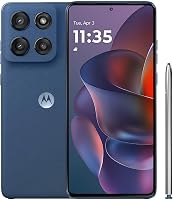
Moto G vs Moto G Power: Which Is Worth Buying? (October 2026)
In the Moto G vs Moto G Power comparison, choose Moto G Power 2025 for screen detail, camera stabilization and wireless charging. Choose Moto g 2026 for battery capacity, or Moto G 2025 for basic use with expandable storage.
On this page (10 sections)
- Moto G vs Moto G Power: which fits your daily routine?
- Which screen is better for reading and watching video?
- Does the Power handle more apps better?
- Which battery and charging features should you prioritize?
- Which camera features matter for everyday photos?
- How should you plan storage and memory-card use?
- What should you check before moving your service?
- How should you set up your new Moto G?
- How do you protect the phone and avoid common mistakes?
- Moto G vs Moto G Power: which should you choose?
Choose Moto G Power 2025 in the Moto G vs Moto G Power comparison if you read often, switch between apps or want a stabilized rear camera. Choose Moto g 2026 if battery capacity comes first, or Moto G 2025 for light daily use with room for a large memory card.
The model year matters as much as the family name. This guide compares these specific US versions, so a newer standard Moto G doesn't automatically replace every feature of the older Power.


Moto G vs Moto G Power: which fits your daily routine?
The Power is the strongest all-round choice here, while the standard Moto G models suit buyers with simpler needs. Start with the task your current phone handles poorly, then choose the model that addresses it.
If small text looks rough, prioritize screen resolution. If apps reload while you move between messages, maps and a browser, give physical RAM more weight.
If you mainly call, send messages and check a few apps, you may get little value from the Power's extra features. The Moto G 2025 covers that buyer pattern, especially if you want to store music or photos on a memory card.
For someone who spends long stretches away from a charger, the Moto g 2026 belongs on the shortlist. Its battery capacity is the largest here, though that doesn't establish a runtime winner.
Moto G vs Moto G Power: who should skip each?
Skip the Power if its screen, camera stabilization and wireless charging would go unused. Those are practical reasons to choose it, but none is essential for calls and occasional browsing.
Skip the Moto g 2026 if sharper text or frequent app switching matters more than battery capacity. The newer model year doesn't give it the Power's display resolution or amount of physical RAM.
Skip the Moto G 2025 if you're replacing a phone because reading or multitasking already feels limiting. Choose it because its basic feature set fits your routine, rather than expecting memory expansion to solve every performance problem.
Which screen is better for reading and watching video?
The Moto G Power 2025 has the clearest screen advantage, with a 6.8-inch OLED display at 2388 x 1080. Both standard models have 6.7-inch displays at 1604 x 720, with an LCD on the Moto G 2025.
The extra resolution matters most for small text, detailed photos and pages that pack a lot onto the screen. If you read recipes, emails or articles throughout the day, that difference deserves more weight than a small change in screen size.
All 3 support refresh rates up to 120Hz, which can make scrolling and motion look smoother. The actual rate varies with apps, content and settings, and it doesn't increase the detail in a low-resolution image.
Don't choose among these phones by diagonal size alone. They all have large screens, so check whether you can comfortably reach controls, carry the phone and hold it during a long call.
Larger text and display scaling can make any phone easier to read. Increase those settings before assuming you need to lean closer or keep the screen at maximum brightness.
Does the Power handle more apps better?
The Power offers more room for multitasking, with 8GB of physical RAM compared with 4GB in each standard Moto G configuration here. All 3 use the MediaTek Dimensity 6300 chipset.
That makes memory a more useful dividing line than the processor name. More physical RAM gives the phone more room to keep active apps available, though app behavior and software still affect how often something reloads.
RAM Boost uses internal storage as virtual memory. It doesn't turn either standard Moto G into a phone with the same physical memory as the Power.
Ignore the biggest combined memory number when choosing. Compare physical RAM first, then think about whether you often move between a browser, directions, messages and other apps.
For light use, keep the decision grounded in your habits. Someone who opens one app at a time has less reason to prioritize extra memory than someone who constantly switches tasks.
None of these specs alone establishes demanding gaming performance. If a particular game or work app drives your choice, check its requirements before treating any of these phones as the answer.
Which battery and charging features should you prioritize?
The Moto g 2026 leads on battery capacity, while the Power adds wireless charging. Choose between extra capacity and a charging method you'll actually use.
The Moto g 2026 has a typical capacity of 5200mAh, with a rated capacity of 5100mAh. The Power and Moto G 2025 each have a 5000mAh battery.
Typical capacity describes an estimated batch average; rated capacity is the minimum specified under controlled conditions. Neither number promises how much charge will remain after your own day of calls, streaming and directions.
Weak signal, high brightness and long video sessions can all increase battery use. A modest capacity difference should therefore be one part of your decision, rather than a promise that you can leave your charger behind.
All 3 support wired TurboPower charging at up to 30W with a Motorola TurboPower 30W charger or higher. A higher-wattage charger won't raise that maximum, and charging slows as the battery fills.
The required charger is sold separately for the Power and Moto G 2025. Charger inclusion for the Moto g 2026 varies by market, so check what's included before arranging your charging setup.
Wireless charging makes the Power useful for someone who prefers setting a phone on a charging pad at a desk or bedside. It is a convenience feature, rather than evidence that the phone lasts longer between charges.
Which camera features matter for everyday photos?
Choose the Power for optical image stabilization, especially if camera shake is a common problem in your photos. Motorola says its OIS helps produce sharper low-light photos and smoother video.
All 3 have a 50MP rear sensor that combines 4 pixels into 1 for an effective photo resolution of 12.5MP. That shared headline number doesn't make their camera systems identical.
Stabilization helps with movement of the camera, but it can't freeze every moving child or pet in dim light. For those subjects, better light and a steady position remain useful regardless of which phone you choose.
The Moto g 2026 has a 32MP front sensor, combining pixels for effective 8MP photos. The Power and Moto G 2025 each have a 16MP front camera.
Don't rank selfie quality by sensor count alone. If you mostly take rear-camera photos of family, documents or evening scenes, the Power's stabilization is a clearer feature-based reason to choose it.
For better results with any of them, wipe the lens with a clean microfiber cloth and face your subject toward available light. Move closer when practical rather than relying on heavy digital zoom.
How should you plan storage and memory-card use?
Choose the Power or Moto G 2025 if you want confirmed support for a microSD card up to 1TB. The Moto g 2026 supports expandable memory, but confirm its supported card type and capacity before buying a card.
Each configuration here has 128GB of built-in storage. The operating system, apps and RAM Boost use some of that space, so the full amount won't be available for your files.
Start by checking how much space your current phone uses. Separate app storage from photos, downloaded music and video, since moving suitable media to a card won't reduce every app's storage needs.
A memory card is useful for files you want to carry, but it isn't a substitute for a backup. Keep another copy of important photos before moving files or replacing a card.
Some DRM-protected content on the Power may not move to external storage. Don't plan a large offline video library around the assumption that every download can live on a card.
Leave room for new apps and system downloads instead of filling storage to its limit. If space runs low, clear unneeded downloads and review large files before deleting anything you haven't backed up.
What should you check before moving your service?
All 3 are US unlocked models compatible with major US carriers, including Verizon, AT&T and T-Mobile. Confirm the exact device with your carrier before transferring your number or retiring your old phone.
5G also requires a compatible plan and coverage where you use the phone. A 5G label won't solve weak service at home or guarantee access to every network.
Our guide to unlocked Android phones and carrier basics explains the main checks. For a step-by-step buying checklist, read how to buy an unlocked phone that works in the US.
Match the model year and full model name when ordering the phone, case or screen protector. Moto G and Moto G Power are family names, and an accessory for another version may not fit.
If you're keeping an existing phone as a backup, use how to check whether a phone is unlocked before planning to move service to it later. Keep access to your current phone until the new one can make calls and receive messages.
How should you set up your new Moto G?
Set up service, account access and backups first, then adjust the phone for comfortable daily use. A complete transfer matters more than installing every optional app on day one.
- Back up your current phone. Check photos, contacts and files, and make sure you know the password for the Google account you'll use.
- Plan account recovery. Confirm how you'll access banking apps, password managers and sign-in codes after the move.
- Connect to Wi-Fi and install available updates. Do this before relying on the phone for a busy workday.
- Set a screen lock and fingerprint access. Keep your backup PIN somewhere secure rather than choosing one you'll easily forget.
- Check the transfer. Make a call, receive a message, open important apps and confirm that key photos and contacts arrived.
Adjust font size, brightness and notification settings after the basics work. Give frequent apps a clear place on the home screen, and remove shortcuts you don't need.
Check downloaded maps, music and other offline files separately. Being signed into an app doesn't mean all of its old downloads have transferred.
For more help with activation and the first setup, follow how to use an unlocked phone for the first time. Keep the old phone intact until you've confirmed your accounts and backups.
How do you protect the phone and avoid common mistakes?
Use a model-specific case and sensible charging habits, and treat water protection as a backup against accidents. Glass protection and water resistance don't remove the need for care.
The Power has Gorilla Glass 5 and a vegan leather design, with underwater protection described by Motorola. Check the permitted conditions before exposing it to water deliberately.
The Moto G 2025 has Gorilla Glass 3 and a water-repellent design for moderate fresh-water spills, splashes or light rain. It isn't designed for submersion, pressurized water or other liquids, and that protection can diminish over time.
Keep charging connections dry, avoid leaving the phone in a hot car and follow its care instructions when cleaning it. If a case traps grit, remove it and clean both surfaces gently.
The biggest buying mistakes are choosing by the word “Power,” treating RAM Boost as physical RAM and assuming a newer year wins every comparison. Compare the specific feature that solves your need.
Also avoid assuming that storage expansion fixes slow apps or that matching camera megapixels means matching photos. Those numbers describe different parts of the phone, and they answer different buying questions.
Moto G vs Moto G Power: which should you choose?
Buy the Power if you regularly read on your phone, switch between several apps or want rear-camera stabilization. Its combination of screen detail, physical memory and wireless charging makes it the most complete choice here.
Choose the Moto g 2026 if battery capacity is your main priority and you accept its lower-resolution display. Choose the Moto G 2025 if your routine is mostly calls, messages and light app use, with extra media stored on a card.
For this Moto G vs Moto G Power decision, name your 2 most-used tasks before ordering. If neither needs the Power's extras, a standard Moto G can be the more sensible fit.
Our Moto G Power buying guide takes a closer look at who should choose it. If none of these matches your needs, compare the best Motorola phones before settling on a model.
| Product | Best for | Display | Battery | Storage | Our score |
|---|---|---|---|---|---|
| Moto G Power 2025 | frequent multitaskers | 6.8-inch OLED, 2388 x 1080 | 5000mAh | 128GB, microSD up to 1TB | 8.3 |
| Moto g 2026 | battery-focused buyers | 6.7-inch HD+, 1604 x 720 | 5200mAh typical capacity | 128GB, expandable memory | 7.8 |
| Moto G 2025 | light everyday use | 6.7-inch LCD, 1604 x 720 | 5000mAh | 128GB, microSD up to 1TB | 7.7 |
Frequently asked questions
Is the Moto G Power better than the Moto G?
The Moto G Power 2025 is the stronger choice for reading, switching between apps and photos where camera shake is a concern; it adds a higher-resolution OLED screen, more physical RAM and optical image stabilization. Choose the Moto g 2026 instead if its larger battery capacity matters more to your routine.
Which has the bigger battery, Moto G or Moto G Power?
The Moto g 2026 has the biggest battery here, with a typical capacity of 5200mAh and a rated capacity of 5100mAh; the Moto G Power 2025 and Moto G 2025 each have 5000mAh batteries. Actual runtime depends on screen settings, signal strength, apps, temperature and how you use the phone.
Does Moto G Power have a better screen than Moto G?
The Moto G Power 2025 has the sharper screen: a 6.8-inch OLED panel at 2388 x 1080; both Moto G models have 6.7-inch screens at 1604 x 720. All 3 support refresh rates up to 120Hz, but a high refresh rate improves motion rather than adding detail to text or images.
Do these Moto G phones work with major US carriers?
All 3 US models are unlocked and compatible with major US carriers, including Verizon, AT&T and T-Mobile. Confirm the exact device with your carrier before moving service, especially if you need a particular plan feature; our guide to unlocked phones and carrier compatibility explains the checks to make.
Can you add a microSD card to Moto G or Moto G Power?
The Moto G Power 2025 and Moto G 2025 accept microSD cards up to 1TB, sold separately; the Moto g 2026 supports expandable memory, but confirm its supported card type and capacity before choosing a card. Use extra storage for suitable media files, and keep a separate backup of important photos.