Best Samsung Phones (October 2026)
The Galaxy A17 5G is the best Samsung phone here for everyday use, especially if you keep plenty of photos and files. Choose the Galaxy A37 5G if evening photography and stronger water and dust protection are your main priorities.
On this page (7 sections)
- Which best Samsung phone pick fits your priorities?
- The best Samsung phones for different needs
- How should you compare these Samsung phones before buying?
- How should you set up your new Samsung phone?
- How can you get more useful photos and battery life?
- Which common Samsung phone buying mistakes should you avoid?
- Which best Samsung phone should you choose now?
The best Samsung phone here for everyday use is the Galaxy A17 5G, especially if you keep a growing collection of photos and files. Choose the Galaxy A37 5G if evening photography and stronger protection against water and dust matter more.
This shortlist covers 2 Galaxy A-series models, rather than Samsung's entire range. Both make sense for buyers who want a large screen and long software support, but their most useful differences point to different households.
Start with what your current phone gets wrong. Running out of photo space calls for a different choice than missing evening pictures or struggling to hold a large handset.
If you're deciding between brands, our Pixel vs Samsung comparison explains the broader tradeoffs. For a family member who needs a simpler shortlist, see our guide to the best Android phones for seniors.
Our picks at a glance
-
1

-
2
Which best Samsung phone pick fits your priorities?
The A17 is the first choice for local file storage, while the A37 better suits buyers who care about evening photos and added protection. Pick the feature you'll use each week, rather than choosing by a small score difference.
NeighborlyNod compared storage options, camera tools, protection, charging requirements and software support. The scores place these phones close together because each has a clear buyer, rather than one model winning every part of the comparison.
Use the table to narrow your choice, then read the practical limits below. A phone can meet every specification on your list and still feel too large or require a charger you don't already have.
| Product | Best for | Display | Built-in storage | Protection | Our score |
|---|---|---|---|---|---|
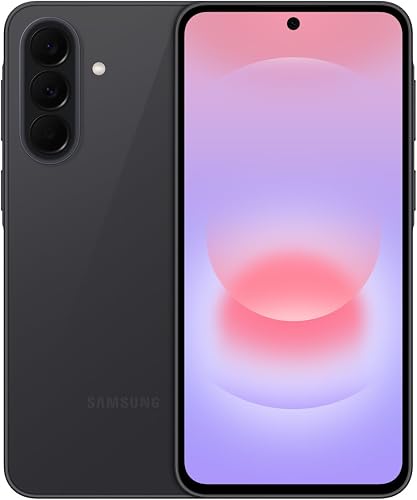
| Galaxy A17 5G | photo collectors | 6.7 in FHD+ Super AMOLED | 128GB | IP54 splash and dust resistance | 8.0 |
| Galaxy A37 5G | evening outings | 6.7 in Super AMOLED | 128GB | IP68 water and dust resistance | 7.9 |
The best Samsung phones for different needs
The A17 suits everyday use with a growing photo library, and the A37 suits buyers who want more camera tools for nights out. Neither is an obvious choice for someone whose main requirement is a compact phone.
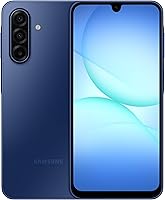
Galaxy A17 5G
- 6.7 in FHD+ Super AMOLED display
- 128GB built-in storage
- Expandable storage up to 2TB
- 6 OS upgrades and 6 years of security updates
Choose the A17 for everyday calls, videos and a growing local photo collection. Its confirmed memory card capacity gives you a clear path to adding storage.
Pros
- Supports microSD cards up to 2TB
- 6 OS upgrades and 6 years of security updates
- Large screen for reading and video calls
Cons
- Splash resistance does not cover swimming
- 25W charger and microSD card sold separately
The Galaxy A17 5G fits someone who keeps family pictures, downloaded videos and documents close at hand. It has 128GB of built-in storage and supports a separate microSD card up to 2TB, giving you a defined expansion option.
Its 6.7 in FHD+ Super AMOLED display provides a large area for reading messages, following recipes and making video calls. That screen is useful if you enlarge text, though you'll still need to check whether the phone feels comfortable in your hand.
The triple-lens camera covers everyday photos, while Circle to Search with Google can help identify something you see on screen. Samsung Wallet supports compatible cards and memberships, so check your bank's participation if phone payments matter to you.
Choose the A17 if local storage is your main reason to replace your phone. Skip it if your priority is the A37's low-light camera features or stronger protection, and remember that the A17's 25W charging adapter is sold separately.
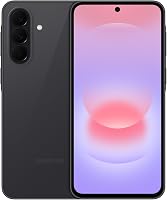
Galaxy A37 5G
- 6.7 in Super AMOLED display
- 128GB built-in storage
- 50MP HDR main camera with Nightography
- IP68 water and dust protection
Choose the A37 if evening photos, photo editing and added protection against water and dust matter most. Samsung also positions its Exynos 1480 processor for gaming and multitasking.
Pros
- Nightography for low-light photos and videos
- My Filter, Object Eraser and Edit Suggestion tools
- 6 OS upgrades and 6 years of security updates
Cons
- 45W charger sold separately
- Large display may not suit buyers seeking a compact phone
The Galaxy A37 5G fits buyers who regularly take pictures at evening gatherings, dinners and indoor events. Samsung says its 50MP HDR main camera and Nightography help capture low-light photos and videos without manual adjustments.
My Filter, Object Eraser and Edit Suggestion give you more ways to adjust a picture afterward. Those tools are useful if you enjoy editing on your phone, though choosing a good angle and enough light still matters.
The A37 combines Gorilla Glass Victus+ with IP68 protection. Its Exynos 1480 processor is also part of Samsung's pitch for gaming and multitasking, making this the more relevant option to consider if those uses drive your purchase.
Choose the A37 when its camera tools and protection address a clear need. Skip it if you mainly want a basic replacement for calls and messages, or if you want a smaller handset; its Super Fast Charging 2.0 also requires a separately sold 45W adapter.
How should you compare these Samsung phones before buying?
Start with fit, carrier support and your main daily task. Once those are settled, compare storage, photography and protection in that order of importance to you.
Is either Samsung phone small enough for you?
Both phones have 6.7 in displays, so screen size won't separate them. A large screen helps with reading and video, but diagonal size doesn't tell you how easily you'll reach the top of the screen.
Try holding a similar-size phone with a case fitted before ordering. Check whether you can type comfortably, answer a call with one hand and fit it into the pocket or bag you actually use.
For a parent, ask them to read a message and make a call rather than judging by screen size alone. Larger text helps only if the buttons, grip and daily steps also feel manageable.
Which Samsung phone is better for your photos?
Choose the A37 for its low-light tools if evening pictures are a regular part of your week. The A17 is the more direct fit when keeping a large local photo collection matters more than editing features.
Think about the pictures you miss now. Dim restaurant scenes, moving children and distant subjects are different challenges, so a higher megapixel number alone shouldn't settle the decision.
For either phone, move closer when safe instead of relying heavily on digital zoom. More light and a steadier hold often do more for a useful picture than changing several camera settings.
If you mostly send pictures through messaging apps, consider how much editing you'll realistically do. Camera tools deserve weight when they solve a recurring problem, rather than simply adding another feature to learn.
How much storage do you actually need?
Choose storage around your current files and expected growth. Check how much space your existing phone uses, then separate photos and downloads from apps and system files.
A memory card is useful for supported photos, videos and documents, but it doesn't make all built-in storage needs disappear. Apps, updates and some downloads may still need room on the phone itself.
The A37 also supports expandable memory, but a compatible card capacity isn't established here. Confirm the supported card type and limit before planning a large offline library around it.
Don't buy the largest card simply because the A17 supports it. A smaller card may cover your needs if you regularly move old videos to another device and keep a separate backup.
Which protection level matches your routine?
The A37's IP68 protection provides a stronger water and dust specification than the A17's IP54 protection. That difference deserves attention if your phone often goes along on outdoor errands or sits near accidental spills.
Samsung describes the A17's protection as resistance to fresh-water splashes and limited dust ingress under controlled conditions. It advises against beach or pool use.
Treat both phones as electronics that should stay dry whenever possible. Protection can weaken through wear or damage, and a protective case doesn't turn a phone into swimming equipment.
Choose a case for drops and grip as a separate decision. Water resistance, screen glass and a case address different risks, so none replaces careful handling.
Will either Samsung phone work with your carrier?
Check the exact model with your carrier before ordering. An unlocked phone allows a choice of supported carriers, but that label doesn't promise every network feature on every plan.
Our guide to what an unlocked phone means explains the basics. If you're unsure about your current handset, how to check whether your phone is unlocked covers that separate question.
For Verizon, read our guide to using an unlocked phone with Verizon. Ask about activation, calls, messaging and any carrier feature you depend on.
Keep the exact model information handy when speaking to the carrier, and use its device compatibility check when available. The broader unlocked Android phone buying guide can help you organize the checks before committing.
How much should software support influence your choice?
Long software support matters most if you keep phones for years. Samsung promises 6 OS upgrades and 6 years of security updates for both models, so that commitment doesn't clearly separate this pair.
For the A17, Samsung states that the support period begins at global manufacture. Don't assume buying older stock starts a fresh support window.
Security updates and OS upgrades serve different purposes. Security fixes address vulnerabilities, while OS upgrades can change features and the interface.
If you're buying for someone who dislikes changes, plan to help after major upgrades. A long support promise is most useful when the phone actually receives and installs the available updates.
How should you set up your new Samsung phone?
Back up your old phone before transferring anything, then confirm the new phone handles your essential tasks before erasing the old one. Work through setup while you still have access to your old number and accounts.
Prepare your accounts and backup
Make sure you know the passwords for your main email and other essential accounts. Check how you'll receive sign-in codes if they normally arrive on the phone you're replacing.
Save important photos, contacts and documents somewhere separate from the old handset. Also check apps with their own backup steps, especially messaging apps and authenticator apps.
Write down which banking, work and health-related apps you need to restore. Some services require a fresh sign-in or approval even after an app transfer.
Activate service before relying on the new phone
Follow your carrier's instructions for moving service, including the correct SIM method for the exact handset. Don't assume that transferring apps also transfers your mobile number or plan.
Make an outgoing call, receive a call and send a message. Then turn off Wi-Fi briefly to confirm mobile data works where you normally use the phone.
If something fails, keep the old handset intact while you contact the carrier. Our guide to using an unlocked phone for the first time explains the activation process in more detail.
Make the home screen useful
Put calls, messages, the camera and your most-used apps where you can find them quickly. Remove extra shortcuts that make the first screen harder to read.
Adjust text size, brightness and screen timeout to suit your eyes and routine. A longer timeout can help while reading instructions, but it also leaves the display on longer.
For a family member, build the layout around their habits. Show them how to return to the home screen, find a missed call and dismiss a notification before introducing optional features.
Secure the phone before adding sensitive accounts
Set a screen lock you can remember and keep recovery information somewhere safe. Avoid a code that another person could easily guess from your birthday or address.
Review account recovery details before adding payment or banking apps. An old recovery number can become a problem if you later lose access to the phone.
For Samsung Wallet, check that your card and bank are supported before depending on it during an errand. Keep another payment method available while you learn the setup.
Check charging equipment and finish updates
Use Samsung-approved chargers and cables that support the intended charging mode. A USB Type-C connector by itself doesn't confirm that an adapter supports a phone's fastest charging option.
Inspect an existing cable for loose ends, splits or other damage before reusing it. Charging speed also depends on battery level and other conditions, so it won't stay constant through an entire charge.
Install available system and app updates, then let any photo syncing finish. Keep the old phone until calls, account access and important files all work on the replacement.
How can you get more useful photos and battery life?
Start with simple habits before changing advanced settings. A clean camera lens, sensible screen brightness and fewer unnecessary background tasks can improve daily use without adding more apps.
Make the camera easier to use
Wipe the lens with a clean, soft cloth before taking an important photo. Fingerprints can make bright lights look hazy, especially in evening scenes.
Tap the subject on screen to guide focus, and hold still while the image is captured. For group pictures, check that every face is visible before taking several frames.
Use the A37's editing tools on a copy when a picture matters. Removing an object or applying a filter can change the look enough that you'll want the original later.
For documents, fill the frame while keeping all corners visible. Check that small text is readable before leaving the place where you took the picture.
Find battery drains before changing phones
Look at battery use in settings if the phone runs down sooner than expected. An app using an unusual amount of power deserves attention before you disable useful features across the whole device.
Lower screen brightness when the room allows it, and shorten the timeout if the display often stays on unattended. Downloading media over Wi-Fi before a trip can also reduce repeated streaming on the move.
Both phones have a 5000mAh battery, but capacity alone doesn't predict your runtime. Signal strength, display use, gaming and background activity all affect how often you'll charge.
Avoid leaving the phone in a hot car or under bedding while charging. If it becomes unusually hot, stop demanding tasks and let it cool before continuing.
Keep storage organized without losing files
Review large downloads and duplicate videos before deleting lots of small items. A few long recordings can take more room than many photos.
Check that a backup finished successfully before removing originals. Open several saved files from the backup location rather than assuming a sync icon means everything is safe.
A card inside the handset is useful storage, but it shares the phone's risks of loss and theft. Keep another copy of files you couldn't replace.
Which common Samsung phone buying mistakes should you avoid?
Don't choose by one headline feature or the score alone. The best match is the phone whose strengths solve your actual problem and whose size, setup needs and limits you can live with.
Paying for camera tools you won't use
The A37's camera features matter if you often photograph dim scenes or edit on your phone. They deserve less weight if your camera mainly scans documents or sends quick daylight snapshots.
Look through your recent pictures before deciding. Your own photo habits provide a clearer guide than an imagined future hobby.
Treating memory expansion as a backup plan
Adding a card creates space, but it doesn't protect files if the entire phone disappears. Storage and backup need separate plans.
Also check where new photos are being saved after setup. Inserting a card doesn't mean every app will automatically use it.
Assuming the same connector means the same charging speed
A charger that fits may charge the phone without supporting its fastest mode. Check compatibility before buying a replacement adapter or deciding your existing one is enough.
You don't need another charger solely because you changed phones. Keep a suitable, undamaged adapter if it meets your needs, even if you rarely use the maximum supported charging speed.
Buying a large phone for readability without checking grip
A bigger screen helps only if the person can hold the phone and reach the controls comfortably. Add a case before judging grip whenever you can.
For someone who struggles with small text, adjust the display settings as part of the decision. Screen size and readable text are related, but they aren't the same thing.
Erasing the old phone too early
A successful photo transfer doesn't prove every account is ready. Check authentication codes, banking access, messages and contacts before resetting the old device.
Keep it secure during that transition. Once you're satisfied, follow the old phone's account removal and reset steps before passing it on.
Which best Samsung phone should you choose now?
Choose the Galaxy A17 5G if your main goal is an everyday phone with a clear path to adding local photo storage. Choose the Galaxy A37 5G if evening pictures, editing tools and stronger water and dust protection address needs you already have.
If your current phone's main problem is its size, pause before choosing either one. These models share a large display format, so comfort deserves a check before you order.
The best Samsung phone for you is the one that fixes your daily frustration while fitting your carrier, hand and setup budget. Confirm those basics, decide whether you need a charger or memory card, and keep your backup plan separate.
For a closer look at the first pick, read whether the Galaxy A17 is a good phone.
Frequently asked questions
Which Samsung phone is best for most people?
The Galaxy A17 5G is our top pick here for everyday use and a growing local photo collection. Choose the Galaxy A37 5G instead if low-light photography and stronger water and dust protection matter more; both are large phones, so check comfort and pocket fit before choosing.
Is the Galaxy A37 better than the Galaxy A17?
The Galaxy A37 5G is the better fit for evening photography, with Nightography and a 50MP HDR main camera; it also has IP68 protection. The Galaxy A17 5G offers a confirmed memory card limit of 2TB, making it a clear choice when local file storage drives your decision.
Do these Samsung phones support long-term updates?
Samsung promises 6 OS upgrades and 6 years of security updates for both phones; for the Galaxy A17 5G, that period starts at global manufacture. Check the remaining support window before buying, especially older stock, because the purchase date does not necessarily start a fresh support period.
Can I add storage to a Galaxy A17 5G?
Yes, the Galaxy A17 5G supports a separate microSD card up to 2TB; a card adds room for compatible files, but you should still leave space in built-in storage for apps and system updates. Keep another copy of important photos because a memory card is not a separate backup.
Do I need to buy a charger separately?
The charging adapters are sold separately for both phones; the A17 supports Samsung's 25W Super Fast Charging, while the A37 supports 45W Super Fast Charging 2.0. Use Samsung-approved charging equipment that supports the intended charging mode, and check your existing adapter before adding another one to your order.