US Version vs International Version Phones: Which Is Better? (October 2026)
An unlocked cell phone international version can work in the US if your carrier accepts the exact model and its network features. Choose a US version when you want a simpler route to local service and warranty support.
On this page (10 sections)
- What changes with an unlocked cell phone international version?
- Which of these phones suits a US buyer?
- When is an international version worth considering?
- How do bands and carrier approval affect coverage?
- Will the SIM or eSIM setup be different?
- What should you check about warranty and software?
- What should you verify before placing an order?
- How should you set up the phone after it arrives?
- Which charging and care habits matter most?
- Which version should you choose for your situation?
An unlocked cell phone international version can work in the US, but buy it only after your carrier confirms the exact model and the features you need. A US version is usually the simpler choice for local service and repair support.
“Unlocked” describes the carrier lock, not worldwide compatibility. A phone can accept another carrier's SIM yet lack network support, account eligibility or regional features you expect.
For NeighborlyNod readers using a US number every day, carrier acceptance comes first. Choose the screen, camera and storage after that check, since none of those features can fix an activation mismatch.

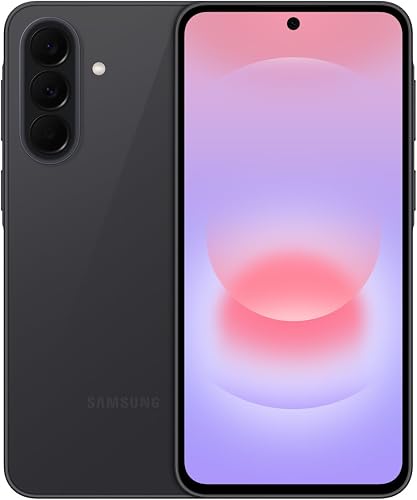
What changes with an unlocked cell phone international version?
The main difference is the intended market, which can affect network hardware, software, SIM options and warranty coverage. Compare complete model numbers, even when the phones share a familiar family name.
“International version” isn't a single technical standard. Ask which country or region the phone was made for, then find the manufacturer's information for that version.
A US version also needs a compatibility check, especially if you use a smaller provider that runs on another carrier's network. Its account rules and supported features may differ from those of the underlying network.
Does an international version unlocked cell phone support every carrier?
No, carrier freedom doesn't guarantee network support. The phone needs the right hardware, and the carrier must accept that device for activation and voice service.
Use the carrier's compatibility tool with the IMEI when available. This device identifier offers a more specific check than a family name; before you have it, ask the carrier what it can confirm from the complete model number.
Our guide to what an unlocked phone means explains how lock status differs from compatibility. Keep those checks separate when comparing versions.
Which of these phones suits a US buyer?
The Galaxy A17 5G suits everyday use, the Galaxy A37 5G suits buyers who want more camera tools, and the Moto G 2025 suits people considering carrier changes. All 3 are US-oriented options here, rather than examples of imported international models.
Their scores reflect the supplied features and fit for this decision. A higher score doesn't override your carrier's answer about a particular device.
Galaxy A17 5G: choose it for storage and years of everyday use
The Galaxy A17 5G fits someone who keeps photos, messages and familiar apps on one phone for years. Samsung promises 6 OS upgrades and 6 years of security updates, measured from global manufacture rather than your purchase date.
Its 6.7-inch FHD+ Super AMOLED screen gives you room for maps, recipes and video calls. The 128GB storage can expand with a microSD card up to 2TB, useful for local photos and downloaded media.
Samsung includes a US 1-year manufacturer warranty. That provides a clear regional support starting point, though your carrier must still confirm activation.
Skip it if your main reason for upgrading is stronger water protection or the A37's additional camera tools. The A17's IP54 protection covers limited dust exposure and fresh-water splashes, so keep it away from pools and immersion.
Galaxy A37 5G: choose it for photos and editing
The Galaxy A37 5G suits someone who often photographs family events and wants editing tools on the phone. Its 50MP HDR main camera, Nightography, Object Eraser and Edit Suggestion give you more photo options without adding another app.
This is an explicitly named US version with 128GB storage and a US 1-year warranty. Its Exynos 1480 processor also makes it the option here to consider when app switching and games matter alongside photos.
IP68 protection and Gorilla Glass Victus+ are useful reasons to consider it for daily use around dust or accidental water exposure. Water resistance still calls for care, rather than deliberate underwater use.
Skip it if calls, messages and occasional photos cover your needs. Samsung promises the same number of OS upgrades and years of security updates as the A17, so choose it for the added features you'll use.
Moto G 2025: choose it for carrier flexibility and entertainment
The Moto G 2025 suits someone who may change US providers and wants straightforward everyday entertainment. Motorola names Verizon, AT&T and T-Mobile among its compatible carriers, giving you a useful starting point for comparison.
Its 6.7-inch LCD supports refresh rates up to 120Hz, while stereo speakers and a 3.5mm headphone jack provide different ways to listen. Storage expansion up to 1TB helps with downloaded music and videos.
The phone has 4GB of physical RAM and 128GB storage. RAM Boost borrows storage as virtual memory, so don't read an expanded RAM figure as an equal amount of physical RAM.
Skip it if you expect heavy multitasking or want the Samsung models' AMOLED screens. Its water-repellent design is for spills, splashes and light rain, not submersion.
When is an international version worth considering?
Consider an international version when it offers a specific benefit you need and passes every compatibility and support check. Travel alone isn't a reason to favor it, since a compatible US phone may also accept service abroad.
A frequent traveler should check the exact destinations and networks involved. Support for your home carrier doesn't establish support for a local travel SIM, and the reverse is also true.
Also decide how you'll receive bank codes and calls sent to your home number. A travel data plan may provide internet access without replacing the calling and messaging functions of your main line.
Skip an imported model if it's your only phone for work or essential account access and activation remains uncertain. The practical benefit needs to justify the extra repair and setup work.
How do bands and carrier approval affect coverage?
Supported bands and carrier acceptance both matter. A match on one frequency doesn't show that the phone supports the network fully in the places you use it.
Check voice service as well as data, including the carrier's support for voice over LTE. A phone that connects to mobile internet still needs compatible calling support to serve as your main phone.
Ask about your actual use: service at home, work, rural routes and frequent travel stops. Broad national coverage claims don't resolve a hardware mismatch on a particular model.
Our guide to unlocked phones for Verizon covers that network's checks, while using an unlocked phone with Verizon explains the activation questions. For other networks, see using an unlocked phone on T-Mobile or unlocked phone support on AT&T.
Will the SIM or eSIM setup be different?
SIM arrangements can vary by regional model, so confirm the exact setup before choosing a plan. A phone family name or an “international” label doesn't establish eSIM support or the number of active lines.
Ask whether the phone takes a physical SIM, eSIM or both. If you need 2 numbers, also confirm which combinations can stay active and how calls behave while the other line is in use.
Don't assume a travel eSIM provider supports every phone that accepts eSIM. Check its device requirements and your carrier's activation rules before paying for service.
Our guide to SIM cards and eSIM on unlocked phones explains the options. None of the regional labels here should replace a model-specific SIM check.
What should you check about warranty and software?
Confirm where repairs happen and how long software support remains before buying. A working network connection won't make an overseas warranty easier to use.
Distinguish a manufacturer warranty from a seller's separate repair promise. Ask who receives the phone, what proof you need, who pays shipping and whether service requires sending it outside the US.
For updates, find the support policy for the exact model and original region. A promise measured from manufacture or launch doesn't restart when you buy an older phone.
Check any regional feature you depend on, such as payment apps, Wi-Fi calling or language support. Even NFC hardware doesn't guarantee that your bank, payment service and device region work together.
Avoid changing regional software simply to make a phone behave like another version. A different software package can't add missing network hardware and may create update or support problems.
What should you verify before placing an order?
Verify identity, service and support in that order. These checks turn a vague regional label into a buying decision you can defend.
- Record the full model number and intended region. Ask for clarification if either is unclear.
- Run the carrier's device check. Use the IMEI when available and confirm activation on your actual plan.
- Name your essential features. Ask about voice calls, texts, data, hotspot use and Wi-Fi calling as needed.
- Confirm the SIM arrangement. Match it to your home service and any planned travel service.
- Read repair and return terms. Know your options if the received phone differs from what you expected.
- Check charging equipment. Confirm the included items and the power adapter you need.
Save written answers and order details. If the seller can't identify the regional model, choose another device rather than trying to infer it from photos.
For a wider checklist, read how to buy an unlocked phone that works in the US. If you're keeping an existing device, first check whether your phone is unlocked.
How should you set up the phone after it arrives?
Confirm basic service before moving your whole digital life. Keep your old phone available until calls, messages and account access work on the replacement.
Connect to trusted Wi-Fi, install available system updates and confirm that the received model matches your order. Follow your carrier's instructions to insert the SIM or activate the eSIM.
With Wi-Fi turned off, make an ordinary call, send a text and open a webpage using mobile data. Then check incoming calls, picture messages, voicemail and any calling features you rely on.
If data doesn't work, ask the carrier whether an APN setting is needed. Use its instructions rather than copying settings from a different carrier or regional model.
Move authenticator accounts and confirm access to banking and email before erasing the old phone. Keep recovery codes somewhere secure outside the device; our first-time unlocked phone setup guide covers the broader process.
Which charging and care habits matter most?
Use compatible charging gear and protect the phone from heat and moisture. Regional packaging and charging support deserve a separate check from cellular compatibility.
The A17 supports 25W Super Fast Charging, while the A37 supports 45W Super Fast Charging 2.0; both required adapters are sold separately. The Moto G supports up to 30W TurboPower charging with a suitable Motorola charger, also sold separately.
For travel, read the adapter's input-voltage label and use the correct plug adapter for the destination. A plug adapter changes the connection shape, not the voltage the charger accepts.
Keep the charging port dry and avoid worn cables. A case and screen protector can reduce everyday damage, but neither turns splash resistance into permission to immerse the phone.
Back up photos before a trip and download essential maps over Wi-Fi. Expandable storage gives you room for local files, but a memory card shouldn't be your only copy of important photos.
Which version should you choose for your situation?
Choose the version with confirmed service and workable repair terms. An unlocked cell phone international version makes sense when its specific benefit survives those checks.
Pick the Galaxy A17 5G for everyday use centered on storage and long software support. Choose the Galaxy A37 5G when its camera tools and stronger water protection address needs you have.
Pick the Moto G 2025 when switching US carriers and listening to downloaded entertainment matter more than an AMOLED screen. Confirm your account and essential features even with Motorola's broad carrier compatibility statement.
If an international model's exact identity or activation status remains unclear, leave it off your shortlist. Use our unlocked Android phones buying guide to compare alternatives, or unlocked vs locked phones if you're still deciding how to buy.
Frequently asked questions
Is a US version phone better than an international version?
A US version is usually the easier choice for someone using a US carrier and seeking local warranty service. An international version can still fit your needs, but compare the exact model number, carrier acceptance, calling features and repair terms before deciding which version to buy.
Can an international unlocked phone work in the US?
Yes, an international unlocked phone can work in the US when its hardware supports the network and the carrier accepts the exact model; matching a few bands isn't enough. Confirm voice service, mobile data and activation eligibility, plus Wi-Fi calling or other features you need.
Does an international phone have a US warranty?
An international phone doesn't automatically include US warranty service; coverage depends on the manufacturer's regional terms and any separate seller warranty. Before buying, confirm who handles a covered repair, where you must send the phone, which documents you need and who pays any shipping costs.
Will an international phone receive US software updates?
An international phone may follow the software schedule for its original market rather than the US version's schedule; check the manufacturer's policy for the exact model and region. Changing the SIM card doesn't establish a new update promise, and a long support period may already be partly used.
What should I check before buying an international phone?
Check the complete model number, carrier acceptance, supported bands, SIM options and warranty region before buying; then confirm any essential features, including Wi-Fi calling, hotspot use and payment apps. Keep the written compatibility answer and return terms so you can resolve a mismatch if the phone arrives with different details.



