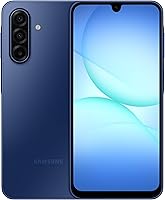
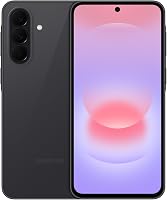
Samsung Galaxy A17 5G Review: Worth It? (October 2026)
Our Samsung Galaxy A17 review points to a good choice for large-screen Samsung users who keep their phones for years. Choose it for its AMOLED display, expandable storage and update commitment, but plan for a separate charger and limited splash protection.
On this page (10 sections)
- Samsung Galaxy A17 review: who should buy it?
- Is the A17 screen right for reading and video?
- What can you expect from the cameras and AI tools?
- How much software support do you actually get?
- Will the storage fit your apps and photos?
- What should you buy for charging?
- How should you protect and care for the A17?
- Which alternative fits your routine better?
- What should you do when the A17 arrives?
- Samsung Galaxy A17 review: which phone should you choose?
Our Samsung Galaxy A17 review recommends it for everyday Samsung users who want a large screen, room for local files and a phone they can keep for several years. Its appeal is practical: reading, video calls and photo storage, backed by a clear software support commitment.
Skip it if a large phone will be awkward to carry or you need stronger water protection. The Galaxy A17 buying guide offers another way to judge whether those trade-offs fit your routine.
Samsung Galaxy A17 review: who should buy it?
The A17 suits people who value screen space and long-term use more than extra camera tools. It makes sense for browsing recipes, reading messages, viewing family photos and handling everyday phone tasks.
Galaxy A17 5G

- 6.7 in FHD+ Super AMOLED display
- 128GB storage with microSD expansion up to 2TB
- IP54 splash and dust resistance
- 6 OS upgrades and 6 years of security updates from global manufacture
A good fit for Samsung users who want room to read, keep local files and use their phone for several years. The compatible fast charger and microSD card are separate purchases.
Pros
- Large FHD+ AMOLED screen
- Expandable storage up to 2TB
- Samsung commits to long software support
- Splash resistance for everyday mishaps
Cons
- 25W charger sold separately
- MicroSD card sold separately
- Not intended for beach or pool use
Its strengths work together: a roomy display helps with reading, expandable storage gives personal files somewhere to go, and Samsung's support commitment matters if you replace phones infrequently.
The limits deserve equal weight. A screen you dislike holding or water protection that falls short of your routine can matter more than features you use occasionally.
Samsung Galaxy A17 review for different buyers
For a parent who mainly calls, messages and looks at photos, the A17 is worth considering if they like its size. Set up readable text and a simple home screen rather than assuming a larger display alone makes a phone easier to use.
For a commuter who downloads videos or keeps family photos locally, storage expansion is useful. Keep a separate backup, since carrying files on a phone or memory card does not protect them from loss.
For someone whose phone is often near pools or exposed to demanding outdoor conditions, choose around protection first. For a keen photographer, compare the A37's camera tools before settling on the A17.
Is the A17 screen right for reading and video?
The 6.7 in FHD+ Super AMOLED display is the strongest reason to choose the A17. It provides room for larger text, video calls and recipes without moving straight to a tablet.
Text size still needs attention. A large screen can show more content at its default settings, but increasing font and display size may help more than simply having extra screen area.
Think about reach as well as readability. If you often hold a shopping bag in one hand while using your phone, consider how comfortably you can reach controls across a large display.
Check your usual pocket or bag before choosing. If possible, handle a similarly sized phone with a case, since protection adds bulk to the object you carry every day.
For other Samsung choices, our guide to the best Samsung phones helps match the brand's options to different priorities.
What can you expect from the cameras and AI tools?
The A17's triple-lens camera covers wide family photos and close-ups, while Circle to Search helps identify things shown on screen. Choose these features for the tasks they support rather than treating camera count as a measure of photo quality.
For family pictures, start with light and positioning. Face people toward a window or another light source, clean the camera glass and move closer when practical instead of relying on digital zoom.
Take several frames when photographing children or pets. This gives you more chances to catch a useful expression without assuming any camera will freeze every moving subject.
Circle to Search needs an internet connection, and results depend partly on image clarity and framing. Circle a distinct item rather than a crowded scene when you want a more focused search.
Samsung also describes voice-driven AI help for finding gathering ideas, adding calendar entries and texting details. Check dates, recipients and wording before sending anything, especially when several people share similar names.
If photography drives your choice, look at sample images from sources you trust. Pay attention to indoor faces and moving subjects, which may be closer to your needs than bright outdoor scenery.
How much software support do you actually get?
Samsung promises 6 OS upgrades and 6 years of security updates from global manufacture for the A17. That makes the phone worth considering if you want to keep it through several software generations.
The start date matters because buying later does not restart that period. Confirm the remaining support window with Samsung if long-term security is a deciding factor.
Support also needs action from you. Enable automatic updates where available and allow time for installations, especially before travel or a day when you depend heavily on your phone.
Keep account recovery details current and back up important files. Software support helps maintain the phone, but it cannot replace access to a lost account or recover photos that were never copied elsewhere.
Will the storage fit your apps and photos?
The A17 has 128GB of internal storage and microSD expansion up to 2TB, with the card sold separately. This suits people who want local photos, videos and documents without fitting everything into the built-in space.
Check storage use on your current phone before choosing a card. Separate apps from photos and downloads, since adding a card does not mean every app can move there.
Buy capacity for your actual habits. Someone who streams music and backs up photos has different needs from someone who keeps offline video and years of family pictures on the device.
Leave some internal space free for app updates and temporary files. Clear downloads you no longer need, and review large videos before deleting smaller items one by one.
A memory card is extra storage, not a backup. Keep another copy of irreplaceable files in a separate location, and confirm that copied files open before removing the originals.
What should you buy for charging?
Plan for a compatible 25W charger, since the A17's wall charger is sold separately. A USB cable comes with the phone, so check what you already have before adding accessories.
Samsung directs users to use Samsung-approved chargers and cables. Replace worn equipment, and do not assume that any adapter with a matching socket will provide the intended fast charging.
The phone has a 5000mAh battery, but capacity does not set a fixed charging schedule. Navigation, video, weak mobile signal and screen settings can change how often you need power.
Charging speed also varies with battery level and other factors. Give yourself a useful charging window rather than planning around an exact refill time.
If battery use seems high after setup, review which apps are using power and check whether the screen stays on longer than you need. Adjust habits and settings before buying accessories to solve the problem.
How should you protect and care for the A17?
Treat the A17 as splash-resistant, not suitable for immersion. Its IP54 protection covers limited dust exposure and fresh-water splashes under laboratory conditions, and Samsung advises against beach or pool use.
The phone has a Gorilla Glass Victus front and a Glass Fiber Reinforced Polymer back. Add a compatible case if your routine involves frequent drops or carrying the phone alongside other objects.
Choose a case that fits the exact model and leaves buttons and ports accessible. A bulky case that makes the phone hard to grip can undermine the reason you bought it.
Keep keys and loose grit away from the screen, and wipe the phone with a soft cloth. Avoid charging equipment or ports that are wet, and follow Samsung's care guidance after accidental moisture exposure.
Keep the phone out of direct sun in a parked car and off hot surfaces. Heat is a reason to change where you use or store a phone, even when the battery still has charge.
Which alternative fits your routine better?
Choose an alternative when it solves a specific need the A17 leaves unmet. The A37 focuses more on camera tools and protection, while the Motorola options offer different screen, sound and storage combinations.
Galaxy A37 5G: for family photos and editing
The Galaxy A37 is the stronger fit here if you want more camera tools within Samsung's range. It combines a 50MP HDR main camera with Nightography and editing features including Object Eraser, My Filter and Edit Suggestion.
Its IP68 protection also gives water exposure more weight in the buying decision. Check Samsung's care limits before relying on any water-resistance feature.
The A37 uses an Exynos 1480 processor and supports Super Fast Charging 2.0 with a separately purchased compatible 45W charger. Skip this alternative if your routine is mostly calls, messages and reading, and those added tools would sit unused.
Moto g 2026: for video and speaker listening
The Moto g 2026 suits people who value stereo speakers with Dolby Atmos and scrolling at up to 120Hz. Its HD+ display has lower resolution than the A17, so weigh moving content and audio against text detail.
Its typical battery capacity is 5200mAh, but that does not establish a runtime advantage for your routine. Actual refresh rate also varies with apps, content and settings.
Skip it if screen resolution is your main reason for replacing your phone. Also distinguish its 4GB physical RAM from RAM Boost, which uses internal storage as virtual memory rather than adding physical memory.
Moto G 2025: for wired audio and local files
The Moto G 2025 fits people who want a 3.5mm headphone jack, stereo speakers and microSD expansion up to 1TB. That combination is useful for a local music library and headphones you already like.
Its HD+ LCD supports refresh rates up to 120Hz, subject to content and settings. The water-repellent design is not waterproof, so it does not solve a need for immersion protection.
Skip it if your main goal is the A17's screen type and resolution. For more options, compare our best budget Android phones and phones for a tighter budget.
What should you do when the A17 arrives?
Start with carrier activation, account access and backups before customizing the phone. Check the exact device with your carrier before buying, and keep your old phone available until the transfer is complete.
Our guide to buying an unlocked phone that works in the US explains the compatibility checks. An unlocked label alone should not replace confirming service for the exact device.
Use this order for setup:
- Connect to trusted Wi-Fi and install available software updates.
- Set a strong screen lock and record account recovery details somewhere secure.
- Transfer contacts, photos and messages, then open a few items to confirm they arrived.
- Make a call and check mobile data away from Wi-Fi.
- Open important banking, messaging and authentication apps before erasing the old phone.
- Adjust text size, notifications and the home screen around your daily routine.
Set up backups before your photo collection grows. If you need help with activation and the first few tasks, follow our first-time unlocked phone setup guide.
Samsung Wallet supports compatible cards from participating banks. Check your bank's eligibility before planning to depend on tap-to-pay, and keep another payment method available during setup.
Samsung Galaxy A17 review: which phone should you choose?
Choose the A17 if reading comfort, local storage and keeping a Samsung phone for years lead your list. Confirm that its size feels manageable, your carrier accepts the exact device and your accessory plans include any charger or memory card you need.
Choose the A37 for its camera and editing tools, the Moto g 2026 for speaker-based entertainment, or the Moto G 2025 for wired headphones and local media. Each earns consideration through a different daily use.
Before ordering, name the one problem your current phone fails to solve. Use the Galaxy A17 buying guide to check whether the A17 addresses that problem without adding a compromise you will notice every day.
Frequently asked questions
Is the Samsung Galaxy A17 5G worth buying?
Yes, if you want a large Samsung AMOLED screen, expandable storage and a long software support commitment. Skip it if you need a smaller phone or protection for water exposure beyond splashes, and include a compatible charger and memory card in your accessory plans if you need them.
Does the Galaxy A17 5G come with a charger?
No wall charger is included; the compatible 25W charger is sold separately. The box contains the phone, USB cable, quick start guide and SIM tray ejector, so check your current charger before buying another and use Samsung-approved charging equipment in good condition.
Can you put a microSD card in the Galaxy A17 5G?
Yes, the Galaxy A17 supports a separately purchased microSD card up to 2TB alongside its 128GB of built-in storage. Some internal space is already occupied, and card storage should be planned around photos, videos and files rather than treated as extra room for every app.
Is the Galaxy A17 5G waterproof?
No, the Galaxy A17 has IP54 protection for fresh-water splashes and limited dust exposure under laboratory conditions. Samsung advises against beach or pool use, so keep it out of water and use a dry place for storage rather than relying on its splash resistance around swimming areas.